

# Ad summary
This ad showcases Skylight, a digital display that helps parents manage their children's daily tasks. It features kids completing chores and getting ready for school, as well as parents interacting with the display. The ad promotes the device as a way to eliminate the need to nag children to complete their daily routines, leading to a happier home environment.
# Brand positioning
Skylight is presented as a family-focused brand offering technology to simplify household management. The brand is positioned as a solution for busy parents who want to instill independence and responsibility in their children. It offers a modern, tech-forward approach to chore management and daily routines. The brand aligns with a lifestyle that values efficiency, organization, and family harmony. It pushes against the traditional, often stressful, dynamic of parents constantly reminding children to complete tasks.
# Product
Skylight is a digital display designed to help families organize and manage daily routines and chores. It features a touchscreen interface and is typically mounted on a wall. The device allows parents to assign tasks to their children, set schedules, and track progress. Children can interact with the display to mark tasks as complete, fostering a sense of accomplishment and independence. The display shows individual profiles for each child in the family. It shows clearly assigned daily tasks such as "Brush Teeth", "Make Bed", "Pack Lunch", "Empty Dishwasher", "Feed Dog", "Take Out Trash". By centralizing task management, Skylight aims to eliminate nagging and create a more harmonious home environment.
# Visual style
The ad has a bright, clean, and modern aesthetic, with a focus on showcasing real-life scenarios and user interactions. The production quality is polished, suggesting a professional commercial feel, although the candid moments with the children lend a touch of UGC authenticity. The editing style uses quick cuts to maintain a fast pace and keep the viewer engaged. Transitions are smooth, and there is a consistent pacing of around 180 BPM.
# Benefits
- [object Object]
- [object Object]
- [object Object]
- [object Object]
- [object Object]
- [object Object]
# Features
- [object Object]
- [object Object]
- [object Object]
- [object Object]
- [object Object]
- [object Object]
# Call to action
None used.
# Point of view
- [object Object]
- [object Object]
# Storyline
- 00:00–00:02 A hand peels off the protective plastic film from the digital display.
- 00:02–00:03 00:02–00:03 Display turns on, showcasing a user interface with profiles and daily schedules. This shows the product activating and ready for use.
- 00:03–00:10 00:03–00:10 Hands interact with the display, marking chores as complete. This segment highlights the ease of use and interactive features of the device from the user's perspective.
- 00:10–00:15 00:10–00:15 Children are shown independently preparing for school. The perspective shifts to a real-life demonstration of the product's impact, showing kids being proactive.
- 00:15–00:20 00:15–00:20 A child brushes their teeth. This highlights the product's positive influence, showing kids willingly engaging in routine activities.
- 00:20–00:30 00:20–00:30 Children are shown cleaning their rooms, followed by hands marking tasks as complete on the display. The combination visually reinforces the idea of kids independently managing chores.
- 00:30–00:39 00:30–00:39 A child collecting eggs, washing dishes, and taking out the trash. This showcases the diverse range of chores that children can manage independently, facilitated by the product.
- 00:39–00:46 00:39–00:46 Hands interact with the display, marking tasks as complete, and a child interacts with the display with celebratory visuals. This highlights the achievement and efficiency that the product enables.
- 00:46–00:54 00:46–00:54 Children are shown celebrating and interacting with the device, followed by a mother with hands clasped together. This emphasizes the positive emotional impact of the product on both children and parents.

How Skylight Advertises on Meta
Refreshed 4 months ago · Weekly refresh cadence
Skylight runs 305 active ads on Meta, shipping ~109 new creatives per week. Their library leans on Demo20%, Screen Recording17%, and Headline8%. Recently, skylight is laser focused on the Calendar Max as the antidote to parental nagging, positioning it as a shared family command center that offloads the mental load from mom (and occasionally dad) by making schedules, chores, and routines visible and actionable for everyone. The messaging hammers home emotional relief and household harmony through testimonials and chaotic morning scenarios solved, with features like color coding and syncing framed as tools for accountability rather than just organization. There's a clear through line around reducing friction in daily family coordination, selling less on tech specs and more on the promise of being less of a nag and more of a sane parent.
Indexed by Motion's Inspo Library.
The 20 Most Recent Skylight Ads on Meta
# Ad summary
This ad showcases the Skylight Calendar Max, a touchscreen family hub that helps organize plans, chores, groceries, meals, to-do lists, and more. It highlights features like color-coding events and chores by person, aiming to keep everyone in the family on the same page. The ad also shows its design as an all-in-one wall-mounted smart calendar.
# Brand positioning
Skylight is presented as a modern, tech-forward brand focused on simplifying family organization through innovative digital solutions. The brand positions itself as a helper for busy families who struggle with managing schedules and coordinating activities, offering a centralized hub that promotes better communication and reduces the need for constant reminders. This product aligns with a lifestyle that values efficiency and connectivity, pushing against the chaos and disorganization of traditional family planning methods. Skylight's positioning is functional, aiming to provide practical tools that improve daily life and reduce household stress.
# Product
The Skylight Calendar Max is a wall-mounted touchscreen smart calendar designed to help families organize and manage their schedules, chores, meal plans, and to-do lists. Functioning as a centralized family hub, it allows users to view and interact with a shared calendar, assign tasks, create grocery lists, and plan meals. Its key feature is the ability to color-code events and chores by person, visually differentiating responsibilities within the family. The product addresses the common pain points of disorganized family life and the need for constant nagging to keep everyone on track. The ad emphasizes the product's all-in-one nature, highlighting its capability to bring the family onto the same page with easy-to-use digital tools.
# Visual style
The ad employs a polished, UGC-style aesthetic with bright, natural lighting and clean visuals. The editing style uses quick cuts to showcase different features and user interactions, maintaining a consistent pace. The production quality appears high, giving it a professional yet relatable feel, likely aimed at appealing to a broad audience on social media. The ad integrates text overlays that sync with key product actions, enhancing the viewing experience and reinforcing the product's benefits.
# Benefits
- [object Object]
- [object Object]
- [object Object]
- [object Object]
- [object Object]
- [object Object]
# Features
- [object Object]
- [object Object]
- [object Object]
# Call to action
Order your Calendar Max today!
# Point of view
- [object Object]
- [object Object]
# Storyline
- 00:00–00:03 00:00–00:03 The ad begins with a POV shot of a woman struggling to lift a large, heavy box labeled "Calendar Max," humorously conveying the frustration of realizing how often one needs to nag others to stay organized. This sets the stage for the product as a solution to family disorganization from a relatable perspective.
- 00:03–00:05 00:03–00:05 The woman opens the box to reveal the Skylight Calendar Max, implying a decision to make a change from traditional methods of organization. This serves as a turning point, transitioning from the problem to the solution the product offers.
- 00:05–00:11 00:05–00:11 The ad showcases the touchscreen functionality of the Skylight Calendar Max, highlighting its ability to manage plans, chores, groceries, meals, to-do lists, and more. This demonstrates the product's capabilities and versatility, illustrating its role as a central family hub.
- 00:11–00:17 00:11–00:17 The ad zooms in on the calendar interface, emphasizing the feature to color code events and chores by person, further detailing the organizational benefits of the product.
- 00:17–00:22 00:17–00:22 A young girl interacts with the calendar, adding and checking off chores, visually representing how the product helps get everyone in the family on the same page. This demonstrates the product's user-friendliness and how it involves all family members.
- 00:22–00:28 00:22–00:28 The ad displays the all-in-one wall-mounted smart calendar, ending with the woman smiling and gesturing towards the product, reinforcing the message that the Skylight Calendar Max is a comprehensive solution. It ends with a direct call to action: "Order your Calendar Max today!"
# Ad summary
This ad showcases the Skylight Calendar Max, a touchscreen family hub designed to organize plans, chores, groceries, meals, and to-dos. The ad opens with the frustration of constantly nagging family members, then demonstrates how the smart calendar can solve this problem by keeping everyone on the same page with color-coded events and an all-in-one wall-mounted design.
# Brand positioning
Skylight is presented as a modern, tech-forward brand offering solutions to common household organizational challenges. The brand positions itself as a family-friendly tech solution for the busy, modern home. It promotes a lifestyle of organization and connectivity, implying a desire to simplify family management and reduce nagging. The brand seems to push against traditional paper calendars and individual digital calendars that can be difficult to share and coordinate. Skylight offers a functional product with an emotional benefit: a harmonious, well-coordinated family life.
# Product
The Skylight Calendar Max is a wall-mounted touchscreen device designed to function as a family's central organizational hub. It manages schedules, chores, grocery lists, meal plans, and to-do lists. Its key features include color-coding events and chores by person, ensuring everyone in the family is on the same page. The calendar integrates seamlessly into a home's decor and is designed for easy interaction and viewing. The product is targeted toward families seeking to streamline their coordination and reduce miscommunication. A primary purchase barrier addressed is the difficulty of managing multiple individual schedules and tasks, which the Calendar Max resolves by centralizing everything in one accessible location.
# Visual style
The ad has a bright and clean aesthetic, resembling UGC content but with a polished feel. The editing style includes quick cuts to maintain a fast pace and keep the viewer engaged. The production quality appears to be a hybrid of UGC and commercial, giving it a relatable yet professional tone. The pacing is fairly consistent throughout the ad, with visuals and text timed to the upbeat music.
# Benefits
- [object Object]
- [object Object]
- [object Object]
- [object Object]
# Features
- [object Object]
- [object Object]
- [object Object]
- [object Object]
# Call to action
Order your Calendar Max today!
# Point of view
- [object Object]
- [object Object]
# Storyline
- 00:00–00:03 00:00–00:03: The ad opens with a POV shot as a woman struggles to lift and open a large box labeled "Skylight Calendar Max" in a well-lit, modern living room. The text overlay reads: "POV: You realize how often you need to nag..."
- 00:03–00:04 00:03–00:04: She opens the box, revealing the Skylight Calendar Max, and smiles at the camera, excited to show the product. This suggests a solution to the problem of nagging.
- 00:04–00:11 00:04–00:11: The ad transitions to a close-up shot of the Calendar Max mounted on a wall, showcasing its touchscreen interface. A hand interacts with the screen, demonstrating various functions such as managing plans, chores, groceries, and meals. The text overlay highlights: "The touchscreen family hub for: Plans, Chores, Groceries, Meals, To-Dos & More!"
- 00:11–00:17 00:11–00:17: The shot widens to show the Calendar Max in a kitchen setting, blending with the home decor. A hand is again shown interacting with the calendar, zooming in to show details of the color-coded events. The text overlay emphasizes: "Color code events & chores by person!"
- 00:17–00:22 00:17–00:22: Two young girls interact with the calendar, adding and managing chores. The text overlay reads: "Get everyone in your family on the SAME page!" The girls then give a thumbs-up, conveying a sense of satisfaction and ease of use.
- 00:22–00:28 00:22–00:28: The woman reappears, standing next to the Calendar Max, pointing to the screen with a smile. The text overlay highlights: "With this ALL-IN-ONE Wall-Mounted Smart Calendar!" She interacts with the device, demonstrating how easy it is to use.
- 00:28–00:29 00:28–00:29: The ad concludes with the woman back in the living room, holding the box and smiling. The text overlay says: "Order your Calendar Max today!", encouraging viewers to purchase the product.
# Ad summary
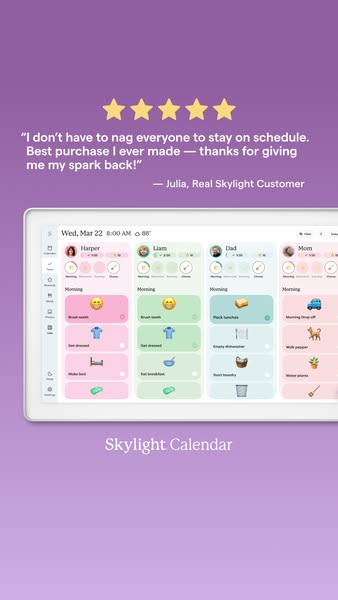
This ad features a customer testimonial about the Skylight Calendar and shows a screenshot of the calendar app running on a tablet.
# Brand positioning
Skylight is presented as a modern tech solution for busy families looking to streamline their scheduling and stay connected. The brand aims to occupy a space in the consumer's mind as a provider of harmony and organization. Its minimalist design and digital interface suggest a forward-thinking approach, differentiating it from traditional paper calendars or complex digital systems. The brand appears to value simplicity and ease of use, aligning with a lifestyle that prioritizes efficiency and family connectivity.
# Product
The Skylight Calendar is a digital calendar designed for families to coordinate schedules. It is showcased on a tablet screen, displaying a color-coded layout for individual family members. The calendar includes features like to-do lists, event scheduling, and chore assignments, all managed via a user-friendly interface. The ad highlights the product's USP of centralizing family organization, making it easier to keep everyone on the same page. The tablet view also features emojis alongside text to create a playful and engaging design, especially for younger family members. The ad addresses the purchase barrier of managing chaotic schedules by presenting the Skylight Calendar as a simple, effective solution for the whole family.
# Visual style
The ad uses a clean and modern visual style with a soft color palette. The image is well-lit and professionally shot, giving it a polished feel. The layout is simple and easy to scan, with a clear focus on the product interface and customer testimonial. The use of emojis and color-coded sections in the calendar app adds a playful touch, making it feel approachable and user-friendly. The overall style aligns with the aesthetics of modern tech and organizational tools, likely to catch the eye of users looking for streamlined solutions.
# Hooks
Headline: "I don't have to nag everyone to stay on schedule. Best purchase I ever made — thanks for giving me my spark back!"
# Benefits
- [object Object]
- [object Object]
- [object Object]
# Features
- [object Object]
- [object Object]
# Call to action
None used.
# Point of view
- [object Object]
# Storyline
- The ad opens with a 5-star rating, immediately signaling positive feedback. This is intended to create a sense of trust and credibility from the viewer's perspective.
- The customer's quote highlights the core benefit of the product – eliminating the need to nag family members and restoring personal "spark." The ad relays the customer's experience to emphasize how the product addresses a common pain point.
- The ad showcases the product interface, showing the calendar displayed on a tablet device, visually demonstrating its ease of use. The brand uses this visual element to communicate the product's modern and family-friendly design.
- The "Skylight Calendar" text at the bottom of the image reinforces the brand and product name. The brand provides direct product recognition while establishing itself as the solution.
# Ad summary
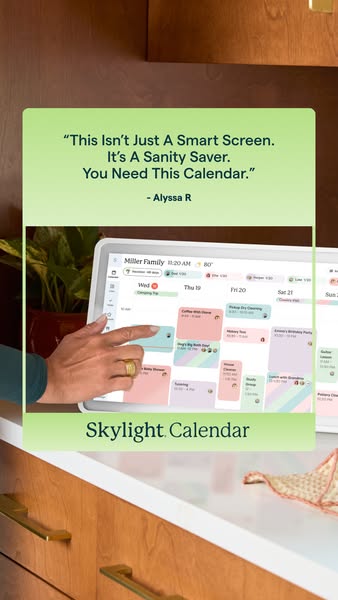
This ad for Skylight Calendar features a testimonial highlighting the product as a sanity saver. A hand is shown interacting with the digital calendar on the device's screen, demonstrating its ease of use and functionality.
# Brand positioning
Skylight Calendar presents itself as a modern solution for family organization, positioning itself as more than just a digital screen but a tool that actively saves one's sanity. The brand seems to cater to busy households looking to streamline their scheduling. By focusing on ease of use and practical benefits, Skylight aims to occupy a space in the consumer's mind as the go-to organizer for modern families, implicitly pushing back against traditional paper calendars or more complicated digital solutions.
# Product
Skylight Calendar is a digital smart screen designed to simplify family scheduling. The product appears as a sleek tablet mounted on a countertop, showcasing a user-friendly interface with color-coded events and easy touch navigation. It’s designed for families seeking an efficient way to manage and visualize their shared schedule, allowing members to stay connected and informed. It visually addresses the potential barrier of complicated digital interfaces by presenting a clean, intuitive design.
# Visual style
The ad has a clean, lifestyle-focused aesthetic with warm, natural lighting. The focus is on showcasing the product in a realistic kitchen environment. The visual style aims for a blend of approachability and modern design, emphasizing the product’s seamless integration into daily life. The image is studio-shot.
# Hooks
Headline: "This Isn't Just A Smart Screen. It's A Sanity Saver. You Need This Calendar."
# Benefits
- [object Object]
# Features
- [object Object]
- [object Object]
# Call to action
None used.
# Point of view
- [object Object]
- [object Object]
# Storyline
- The ad opens with a quote from “Alyssa R” calling the product a 'sanity saver'. This immediately frames the product as a stress-relieving solution, appealing to viewers who feel overwhelmed by scheduling. This testimonial is from a customer POV.
- The image then shows a hand interacting with the Skylight Calendar, highlighting the ease of use and functionality of the device. The viewpoint is from the brand demonstrating the product's interface and seamless interaction. It illustrates how simple it is to navigate and manage a family's schedule.
- The brand name 'Skylight Calendar' is shown at the bottom of the image to reinforce brand recognition and make it clear what product is being advertised.
# Ad summary
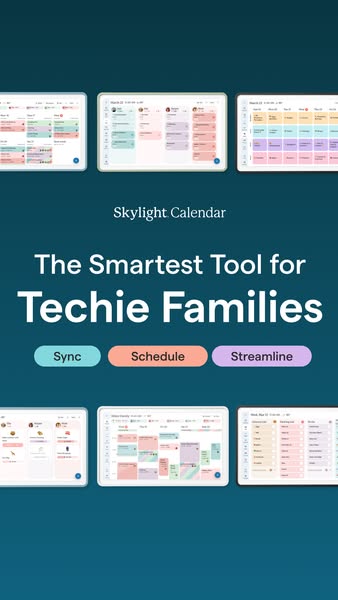
This ad for Skylight Calendar features multiple instances of the product interface on iPads. The ad highlights the product's ability to sync, schedule, and streamline the user's life.
# Brand positioning
Skylight Calendar is presented as a solution for tech-savvy families looking to manage their schedules more efficiently. The brand aims to occupy the space of a technologically advanced organizer, aligning with modern, digitally integrated lifestyles. It emphasizes simplicity and streamlined functionality, promising to declutter busy family schedules with its intuitive platform. The brand positions itself as an essential tool for the tech-forward household.
# Product
Skylight Calendar is a digital calendar application designed for families. The app is presented as a scheduling tool that helps families sync, schedule, and streamline their daily routines. It is shown running on what appears to be an iPad, displaying a user-friendly interface with color-coded events and profiles. The calendar allows for seamless coordination, ensuring that every member of the family stays informed and on schedule. The product addresses the pain points of disorganized schedules and missed appointments, offering a unified platform for managing everyone's activities.
# Visual style
The ad has a clean and modern visual style, with a focus on showcasing the digital interface of the Skylight Calendar app. The use of a solid color background and neatly arranged iPads gives it a polished and professional look. The image treatment is bright and clear, with a focus on legibility and ease of understanding. The typography is clean and legible, contributing to the overall minimalist aesthetic.
# Hooks
Headline: The Smartest Tool for Techie Families
# Benefits
- [object Object]
# Features
- [object Object]
- [object Object]
- [object Object]
# Call to action
None used.
# Point of view
- [object Object]
# Storyline
- The ad starts with a display of multiple iPad screens showing the Skylight Calendar interface, demonstrating the product's digital nature and visual appeal. This is to establish the product's core function and its presence as a technological solution.
- The text then states that the Skylight Calendar is 'The Smartest Tool for Techie Families', positioning the product as a high-end solution for a specific demographic. This message intends to capture the attention of tech-savvy families who value efficiency and organization.
- Finally, the ad presents three key features—Sync, Schedule, and Streamline—in colorful badges, highlighting the main benefits of using the product. The brand wants to reinforce the value proposition by emphasizing its core capabilities.
# Ad summary
A mom and dad try to pull off a silent morning routine with their six children using Skylight Calendar, showcasing how the tablet/app helps to coordinate tasks. They start out strong, but the silence eventually breaks, though they are still successful at completing the morning routine.
# Brand positioning
Skylight aims to occupy the space of an easy-to-use family organizational tool by offering a sleek digital calendar that hangs on the wall and helps to organize daily tasks, routines, and schedules. This brand aligns with the values of efficiency, coordination, and structure for families. Skylight aims to simplify hectic family mornings by giving each member the autonomy to follow the routine as it's displayed.
# Product
Skylight Calendar is a digital family calendar that provides a central hub for organizing schedules, tasks, and routines. It helps to coordinate daily activities and keeps everyone on track. It is designed for families looking for a streamlined way to manage their hectic schedules and daily responsibilities. It features individual profiles for each family member to create and manage to-do lists, schedule events, and assign chores, all accessible on the tablet, or through the app on any device. This ad focuses on solving the challenges of the chaotic morning routine. According to the ad, Skylight Calendar helps families finish tasks like fixing hair and completing chores with silent signaling and ease by having each of these tasks listed in the calendar.
# Visual style
The ad has a homey and casual visual style. It looks like it was filmed on a smartphone, with natural lighting and some jump cuts and quick cuts. The production quality has a UGC feel which supports the casual tone of the ad. There are about 18 cuts per minute, and the pace stays pretty consistent throughout the ad.
# Benefits
- [object Object]
# Features
- [object Object]
- [object Object]
- [object Object]
# Call to action
None used.
# Point of view
- [object Object]
# Storyline
- 00:00–00:02 The mom introduces the video by saying that they attempted to pull off the impossible: a silent morning routine.
- 00:02–00:06 She specifies that the challenge they took on was the "Skylights Silent Sync Challenge". The message is that they will attempt to have a silent morning.
- 00:06–00:08 A girl taps the Skylight calendar on the wall and the mom says, "Zero words, one calendar". This sets the scene, and introduces what tool they will be using to complete the morning routine.
- 00:08–00:12 The mom wonders if they can make it through their morning routine, as a girl taps the Skylight calendar. She then says that they started out strong, as we see kids making their beds.
- 00:12–00:18 The mom explains, "No one had to ask what's for breakfast". This is followed by, "And our silent signaling to finish tasks like fixing hair was on point." We see the father and children at the table, then girls fixing each other's hair in the bathroom, and the father points at the calendar to assign chores.
- 00:18–00:27 The mom says that they held back some laughs when the calendar was assigning the chores, then says, "Of course, there were a few moments the silence broke". A child shouts.
- 00:27–00:36 The mom concludes by saying that they managed to get through all their morning tasks as a team. She adds, "I even found the kids putting away their toys without being asked. And that never happens!" We see kids putting away dishes, toys, and then hanging out in the living room.
- 00:36–00:49 The mom says that, while there was still some chaos, and they technically failed at the silence piece, they nailed the coordination and teamwork. She concludes by saying, "Turns out we really are in sync all thanks to the Skylight Calendar!"
# Ad summary
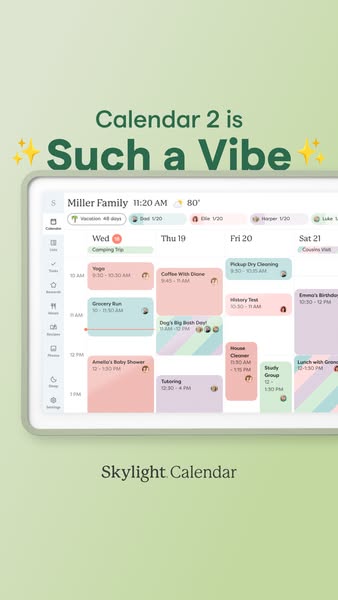
This ad promotes the Skylight Calendar app as a great choice for organization. The ad emphasizes its visual appeal and ease of use by showcasing a fully populated calendar screen.
# Brand positioning
Skylight is presented as a modern and aesthetically pleasing solution for family organization. The brand is positioned as one that understands the importance of both functionality and visual appeal, targeting consumers who value a blend of utility and style in their daily tools. The brand promotes a lifestyle where staying organized doesn't have to be a chore, but rather an enjoyable and visually pleasing experience, pushing against the norm of purely functional, less attractive organizational tools.
# Product
The Skylight Calendar is a digital calendar application designed to help families stay organized and coordinated. It works by providing a shared platform where all family members can view and contribute to a single calendar, ensuring everyone is aware of upcoming events, appointments, and tasks. The calendar displays a full week view on a tablet screen. Each day is populated with various color-coded events and reminders. The interface is designed to be intuitive, with a clean and modern aesthetic that makes it easy to navigate and use. The ad addresses the common frustration of managing a busy family schedule by offering a centralized, visually appealing, and easy-to-use solution.
# Visual style
The ad employs a clean and modern visual style. The production quality is highly polished, with a focus on showcasing the digital interface of the Skylight Calendar app. The image treatment includes soft lighting and background removal to isolate the tablet screen. The typography is large and legible, ensuring scannability in feed. The ad mimics a platform-native style, resembling a screenshot taken directly from a tablet device. This style is likely intended to enhance stop power in feed by presenting the product in a relatable, real-world context.
# Hooks
Headline: Calendar 2 is Such a Vibe
# Benefits
- [object Object]
- [object Object]
- [object Object]
# Features
- [object Object]
- [object Object]
- [object Object]
# Call to action
None used.
# Point of view
- [object Object]
- [object Object]
- [object Object]
# Storyline
- The ad opens with the statement “Calendar 2 is Such a Vibe” using a stylish font. This is intended to immediately grab the viewer's attention and convey that the product is not only functional but also aesthetically pleasing, from a brand perspective.
- The ad displays a screenshot of the Skylight Calendar interface on a tablet. This is designed to show the viewer exactly how the product looks and functions, providing a clear visual representation of its features and ease of use, from a customer perspective.
- The ad concludes with the brand name “Skylight Calendar” at the bottom. This reinforces brand recognition and clearly identifies the product being advertised, from a brand perspective.
# Ad summary
A dad recommends the Skylight Calendar to help manage his family's busy schedules. He emphasizes the ease of updating the calendar from his phone and its color-coded design for each child.
# Brand positioning
Skylight aims to simplify family scheduling and organization. The brand positions itself as a modern solution to the challenges of managing multiple schedules. It aligns with the values of convenience and clarity. Skylight differentiates itself from traditional paper calendars or digital apps by offering a large, wall-mounted touchscreen that's easy for the whole family to view and interact with. The brand promotes a functional approach to organization. Skylight offers multiple products that sync together to provide one home hub.
# Product
The featured product is the Skylight Calendar, a large, wall-mounted touchscreen device designed for family organization. It syncs with a phone app, allowing users to update schedules remotely, and displays each family member's activities in a color-coded format. It is designed for families with multiple members, especially those with busy schedules. The calendar allows setting up each kid’s morning routine step by step so the children can earn rewards by completing each task. Key features include the large screen size, ease of use, and the ability to update it from anywhere. The product addresses the pain point of managing multiple schedules and ensures that 'nobody has excuses' for missing events. The app enables parents to set up each kid's morning routine.
# Visual style
The ad has a UGC (user-generated content) feel, with natural lighting and casual camera work. The editing is quick and snappy, with cuts timed to emphasize points or illustrate activities. The production quality is simple, with a focus on conveying information clearly rather than showcasing high-end visuals. The pacing is consistent, with frequent cuts to maintain viewer engagement. There is an attempt to sync actions with voiceover lines, but this is not strictly beat-based.
# Benefits
- [object Object]
- [object Object]
- [object Object]
# Features
- [object Object]
- [object Object]
- [object Object]
# Call to action
Click below and upgrade your family to Skylight Calendar.
# Point of view
- [object Object]
# Storyline
- 00:00–00:06 A dad introduces the CalMax calendar, stating that his family loves it so much that they bought one for his mother-in-law for Mother's Day.
- 00:06–00:07 He then offers to show how it works, addressing the need for clear instruction.
- 00:07–00:12 He explains that having four kids means managing multiple schedules for practices, activities, and school, emphasizing the complexity of his family's logistical needs.
- 00:12–00:14 He shows the CalMax, describing its feature of having all schedules in one place, streamlining information.
- 00:15–00:17 He states he updates the schedule on his phone, emphasizing convenience and accessibility.
- 00:17–00:22 He points out that the screen updates in seconds, and that each kid has their own color so at a glance the family knows each person's schedule.
- 00:23–00:27 The dad touts the screen size as the reason his family went with it, and states that now nobody has excuses, promoting clear communication and responsibility.
- 00:28–00:32 He shows that users can set up each kid's morning routine step by step in the app.
- 00:32–00:41 He shares that his kids go through it, check it off and earn rewards, and it has become this weird competition that he did not see coming, which he states he has not experienced in his parenting life.
- 00:41–00:45 A screen displays the Skylight Calendar brand name, followed by the call to action to upgrade your family to Skylight Calendar.
# Ad summary
This ad promotes the Skylight Calendar, a digital calendar designed to help families organize their schedules and tasks, reducing the need for parents to constantly remind their children of their responsibilities.
# Brand positioning
Skylight Calendar is presented as a family organization tool designed to reduce stress and improve communication within households. The brand positions itself as a solution to the common parental frustration of constantly reminding children about their schedules, chores, and homework. By offering a shared, easily accessible digital calendar, Skylight aims to streamline family life, reduce nagging, and foster independence among children. The brand aligns with a lifestyle of organized, efficient family management, promoting harmony and reducing mental load for parents. The brand pushes against the chaos of traditional paper calendars or relying solely on verbal reminders. Functionally, it emphasizes simplicity and ease of use, with an emotional appeal targeting the relief and empowerment of parents seeking a more organized family life.
# Product
The Skylight Calendar is a digital calendar and organization tool designed for families. It features a large, touchscreen display that can be mounted on a wall or placed on a countertop. The calendar allows family members to view and manage their schedules, tasks, and chores in one central location. Each family member has their own profile, visually distinguished by a circular avatar and color coding. The device allows for the assignment of tasks, setting reminders, and tracking progress. The calendar helps to keep everyone on the same page and reduce the need for constant reminders. It offers a streamlined, visually appealing way to manage family life. The primary USPs are its ease of use, its ability to centralize family schedules, and its effectiveness in reducing parental nagging. The device is designed to address the common purchase barrier of disorganization and the frustration of constantly reminding family members about their responsibilities, making it a valuable tool for busy families seeking to improve their daily routines.
# Visual style
The ad has a clean, brightly lit aesthetic. The editing style combines static shots with minimal camera movement. The production quality is polished, with a focus on clear visuals and easy-to-read text. The pacing is moderate, with cuts timed to emphasize key phrases. The visuals are timed to sync with the voiceover, reinforcing the message being conveyed. The overall tone is informative and reassuring, aiming to present the Skylight Calendar as a practical and effective solution for family organization.
# Benefits
- [object Object]
- [object Object]
- [object Object]
- [object Object]
- [object Object]
- [object Object]
# Features
- [object Object]
- [object Object]
- [object Object]
- [object Object]
- [object Object]
- [object Object]
- [object Object]
# Call to action
None used.
# Point of view
- [object Object]
# Storyline
- 00:00–00:04 The ad begins with a focus on the problem parents face. The ad calls out a universal truth for parents - constantly nagging kids about tasks. The goal is to get parents to self-identify with a problem they want to solve. The tone is direct and a bit humorous, using exaggeration to land the point.
- 00:04–00:11 Next, the ad introduces Skylight Calendar as a solution. The intention is to show the product as an answer to the problem just described. The tone becomes more informative and hopeful.
- 00:11–00:16 The ad continues describing the benefits of using the Skylight Calendar. It focuses on how kids can independently see what they need to do and days run better. The intention is to highlight the product's impact on both parents and children, reinforcing the idea of a more harmonious family life. The tone is optimistic and reassuring.
- 00:16–00:27 Finally, the ad summarizes the overall benefit: parents no longer have to hold everything in their brain. The intention is to emphasize the mental relief the product offers, positioning it as a way to reduce stress and cognitive load for parents. The tone is empathetic and supportive.
# Ad summary
This ad promotes Skylight Calendar, which is presented as an app/device that is used to organize and manage family activities.
# Brand positioning
Skylight Calendar is presented as a tool that helps families manage and organize their schedules, tasks, and activities. The brand is positioned as a solution for busy families, specifically those with children involved in multiple sports and extracurricular activities. Skylight aims to occupy the space of a family's go-to organization hub, enabling them to run efficiently as a team. The brand promotes values such as teamwork, organization, and making family time more manageable. This ad seems to push against the chaos and disorganization that can come with managing multiple schedules, instead offering a functional solution for families seeking simplicity and better coordination.
# Product
Skylight Calendar is a touchscreen device and app designed to help families organize their schedules and manage activities. The device is shown mounted on a kitchen counter, displaying a color-coded calendar that shows each family member's events. The product is for parents and children of all ages, but primarily geared towards families with children involved in multiple sports and extracurricular activities. It features shared calendars, chore lists, and the ability to assign tasks to family members. The USP of the Skylight Calendar is its ease of use and ability to streamline family organization, reducing chaos and confusion. The ad shows it being used for managing sports schedules, practices, and other family events. It addresses the purchase barrier of managing a complex family life by providing a tool that simplifies scheduling and task management.
# Visual style
The ad has a hybrid visual style, combining polished commercial footage with a UGC-like feel. The video incorporates quick cuts and transitions, creating a fast-paced rhythm. The editing style includes jump cuts and quick zooms, which support a sense of energy and chaos that mirrors the hectic family life being portrayed. The use of vibrant colors and occasional blue lighting adds visual interest, while the overall production quality feels relatively high, making the ad appear polished despite its informal presentation. The pacing is quick, with numerous cuts per minute, keeping the viewer engaged.
# Benefits
- [object Object]
- [object Object]
# Features
- [object Object]
- [object Object]
- [object Object]
# Call to action
None used.
# Point of view
- [object Object]
- [object Object]
# Storyline
- 00:00–00:02 The ad opens with a woman dancing in her kitchen, lit with a blue light.
- 00:00–00:05 The text "Ladies and gentlemen THE CHAMPION OF FAMILY ORGANIZATION" flashes over her, while a screen shows an app listing family tasks.
- 00:02–00:05 The woman strikes a comical pose with a whisk as the word "Organization" flashes on the screen, establishing a playful and humorous tone.
- 00:05–00:07 Transitioning to a new scene, the same woman introduces the segment as "On this episode of Life as a Sports Family," setting up the premise of the ad.
- 00:07–00:12 Quick shots depict the family's busy schedule with scenes of cheerleading, gymnastics, track, band, and basketball, accompanied by the narrator listing those activities, highlighting the chaos of managing multiple sports and activities.
- 00:12–00:17 A group of family members put their hands together, symbolizing teamwork.
- 00:14–00:17 The narrator introduces the brand, saying, "Our friends at Skylight Calendar are all about helping families run like a team," explicitly connecting the product to the need for family organization.
- 00:17–00:21 Various family members add events to the shared calendar, and the narrator says, "So today, we're putting ours to the test with the Sideline Sprint from Team Matt," setting up the test of the calendar app.
- 00:21–00:27 The announcer says, "And they're off," as quick shots depict the chaos of a busy family, including a child missing a water bottle and another losing a shoe. It is mentioned that "it looks like snack negotiations are getting intense."
- 00:27–00:31 The woman says, "Luckily, we have a game plan, and Skylight helps us keep it all in one place," explicitly tying the product to the solution to family disorganization.
- 00:31–00:33 She ends with, "And somehow, we actually make it," implying the Skylight Calendar helps them manage everything.
# Ad summary
A woman describes the benefits of the Skylight Calendar 2, which helps manage family activities, chores, and meals.
# Brand positioning
Skylight is presented as a modern, family-focused brand providing digital solutions that simplify busy household management. The brand's flagship product, the Skylight Calendar, aims to be an all-in-one hub for organizing schedules, chore tracking, and meal planning, with the overarching value proposition of reducing stress and improving family coordination. Skylight promotes the lifestyle of a busy, modern family with active children, working parents, and an emphasis on shared visibility and ease of use. The brand pushes against the chaos of traditional paper calendars or disparate digital tools by centralizing everything into one aesthetically pleasing display. Positioned between functional utility and emotional relief, Skylight offers a practical yet emotionally resonant solution for modern family life.
# Product
The Skylight Calendar 2 is a wall-mounted digital display designed to streamline family organization. It features a customizable border and serves as a central hub for managing schedules, chores, and meals. Controlled via a companion app, it allows for color-coded scheduling by child, enabling clear differentiation of individual activities. The app includes a reward system for children, incentivizing them to complete assigned tasks and redeem points for gifts. The Skylight Calendar 2 aims to alleviate the stress of planning and managing multiple schedules, providing a clear, easily accessible overview of the family's activities and meals. Its USPs include a user-friendly app interface, visual clarity, and features designed to motivate children, making it an essential tool for busy families seeking greater coordination and reduced daily stress.
# Visual style
The ad features a clean, well-lit aesthetic, giving it a polished feel. The video consists mostly of static shots with simple transitions. There are a few shots of the woman speaking directly to the camera, and a few shots of the digital tablet. The production quality appears to be hybrid; a mix of UGC and polished commercial.
# Benefits
- [object Object]
- [object Object]
- [object Object]
# Features
- [object Object]
- [object Object]
- [object Object]
- [object Object]
- [object Object]
# Call to action
None used.
# Point of view
- [object Object]
# Storyline
- 00:00–00:12 The creator acknowledges being in a busy season of life with work, multiple jobs, running businesses, and managing activities for two young children.
- 00:12–00:20 The creator introduces the Skylight Calendar as the solution that makes it easy for her family to navigate their busy lives.
- 00:20–00:33 The creator highlights the new design, noting that the borders can be switched out to fit any house or vibe.
- 00:33–00:37 The creator says she will show how to use the product, and why the audience needs it.
- 00:37–00:41 The creator points out that the Skylight Calendar is controlled by its app.
- 00:41–00:44 The creator mentions that the app allows the user to color code by child.
- 00:44–00:57 The creator then highlights the reward feature in the app, which the kids love because they can redeem points for a gift after completing a task.
- 00:57–01:02 Finally, the creator mentions that the meal planner is her favorite feature of the Skylight Calendar.
- 01:02–01:15 The creator elaborates on the benefits of using the meal planner, describing it as a game changer.
# Ad summary
This ad showcases the Skylight Calendar 2, highlighting its organizational features such as a shared family calendar and chore charts. It promotes the product as a stylish solution to keep the family connected and organized, available exclusively at Target.
# Brand positioning
Skylight is presented as a brand focused on blending style with functionality in the realm of home organization. It positions itself as a modern solution that helps families stay connected and organized in a visually appealing way, aligning with a lifestyle that values both aesthetics and practicality. The brand aims to occupy the space in consumers' minds as a solution that goes beyond traditional organizational tools by making them also a stylish addition to the home. By collaborating with Hearth & Hand with Magnolia, Skylight further reinforces its commitment to aesthetically pleasing design, distinguishing itself from purely functional organizational products. The brand positioning is both functional (providing organizational tools) and emotional (creating a calmer, more connected home environment).
# Product
The Skylight Calendar 2, in collaboration with Hearth & Hand with Magnolia, is a 15" touchscreen smart calendar designed to keep families organized and connected. It features a shared family calendar that allows everyone to stay on the same page regarding appointments, practices, and reminders. The product also includes a chore chart feature that uses emojis to make chore management simple and engaging for children. It is designed to sync with phones, providing real-time updates. The Skylight Calendar 2 aims to solve the pain point of disorganized family schedules and chaotic home environments by offering a stylish and user-friendly solution that integrates seamlessly into modern homes. It's positioned as a way to achieve a calmer, more connected home and is available exclusively at Target, both in stores and online.
# Visual style
The ad has a mixed aesthetic, combining a UGC-style shopping experience with a polished product demo. The editing style includes quick cuts during the shopping scenes and static shots for the product demo. The production quality is a hybrid, blending the rawness of UGC with the clarity of a commercial. The pacing is moderate, with cuts timed to voiceover lines.
# Benefits
- [object Object]
- [object Object]
- [object Object]
- [object Object]
- [object Object]
- [object Object]
# Features
- [object Object]
- [object Object]
- [object Object]
- [object Object]
# Call to action
Only at Target
In-stores and online
# Point of view
- [object Object]
- [object Object]
# Storyline
- 00:00–00:01 The ad begins with a fast-paced montage of shopping cart POV as it passes products on the shelf.
- 00:01–00:05 00:01–00:05 The speaker states that if the viewer is trying to start the new year more organized and wants it to look cute in their home, then a product shown next is the solution. This frames the ad as an answer to the desire for both functionality and aesthetic appeal, targeting viewers who seek stylish organizational tools. The perspective is from a user who is sharing a personal recommendation, creating a relatable and trustworthy tone.
- 00:05–00:11 00:05–00:11 The speaker introduces the product, a Skylight Calendar exclusive with Hearth & Hand with Magnolia, stating that "this is where style meets real life." This positions the product as a blend of aesthetic design and practical function. The brand is speaking from its official voice to highlight the product and its design collaboration, with a tone that emphasizes sophistication and real-world applicability.
- 00:11–00:17 00:11–00:17 Continuing the narrative, the speaker states that the product keeps an entire family's schedule in one place, including appointments, practices, and reminders, so everyone is on the same page. This expands on the functional benefits of the product.
- 00:17–00:26 00:17–00:26 The speaker transitions to highlighting the chore chart feature, which is described as a "game changer" because even kids can follow along with emojis, making things actually get done. This builds on the product's benefits, demonstrating its practicality and user-friendliness. The perspective shifts to show a hand interacting with the screen while it is explained why this feature is useful.
- 00:26–00:30 00:26–00:30 The speaker states that the Skylight Calendar syncs with phones, so updates happen in real-time, further enhancing the product's utility. The perspective remains focused on the user experience, with a tone that conveys convenience and efficiency.
- 00:30–00:36 00:30–00:36 The ad concludes with the speaker stating that if the viewer is craving a calmer, more connected home this year, the exclusive Skylight Calendar is available only at Target in-stores and online. This reinforces the product's value proposition and includes a call to action. The tone is encouraging and solution-oriented, targeting viewers who aspire to a more organized and harmonious home life. The shopping cart POV returns to reinforce the product's accessibility.
# Ad summary
This ad features a woman sharing how much she loves the Skylight calendar. She explains that all of her kids sports, school and extracurricular activities go on the calendar so that everyone in the family can see it. This way she doesn't have to be the keeper of the knowledge and it is so wonderful.
# Brand positioning
Skylight is presented as an innovative solution for modern family organization, focusing on ease of use, visibility, and shared responsibility. The brand positions itself as a tool to alleviate the mental load associated with managing multiple schedules and activities, particularly for parents. It provides a centralized, digital platform where all family members can access and contribute to the shared calendar, fostering collaboration and reducing the burden on one individual. The brand appeals to busy families who value streamlined communication and a harmonious home environment, differentiating itself by offering a user-friendly alternative to traditional paper calendars or complex digital systems. It promotes a lifestyle of organized simplicity, empowering families to stay connected and coordinated without feeling overwhelmed.
# Product
The Skylight calendar is a digital, wall-mountable display designed to simplify family organization. It allows families to input and share schedules, activities, to-do lists, and chores in one centralized location. It aims to reduce the mental load on individuals by making all information visible and accessible to everyone. The calendar can be customized with different color codes and notifications, allowing for easy differentiation and prioritization of activities. It addresses the common pain point of parents having to constantly remind or inform other family members of upcoming events or tasks. It is for busy families who value shared responsibility and streamlined communication, it enables easy integration of sports calendars, school calendars, and other extracurriculars. The Skylight calendar provides a practical and visually appealing solution for staying organized and connected as a family.
# Visual style
The ad features a natural and authentic aesthetic, resembling user-generated content. The editing is minimal, with static shots and no transitions, contributing to a casual and straightforward feel. The production quality has a UGC feel. The pacing is slow with static shots throughout the ad.
# Benefits
- [object Object]
- [object Object]
# Features
- [object Object]
- [object Object]
- [object Object]
- [object Object]
- [object Object]
# Call to action
None used.
# Point of view
- [object Object]
# Storyline
- 00:00–00:07 A woman is telling the audience about how much she loves her skylight. She says that a friend sent her a text message saying that she cannot keep everything in her brain anymore and asked to know more about the skylight.
- 00:07–00:08 She loves it so much that she sent her friend a three minute voicemail about it.
- 00:08–00:11 She says she loves it so much and wants everyone to have one.
- 00:11–00:19 She explains that every sports calendar, school calendar, activities, to do items and chores all go on the calendar.
- 00:19–00:26 She says that everyone can see it so you don't have to be the keeper of all the knowledge and its wonderful.
# Ad summary
This ad showcases the Skylight Calendar, emphasizing its ability to sync family calendars in one place, promote accountability for kids' chores and routines, and its four-month return policy to reduce the risk of purchase. The ad presents the product as a solution for busy parents seeking to streamline their family's organization and reduce nagging.
# Brand positioning
Skylight is presented as a family-friendly tech solution designed to simplify scheduling and household management. The brand aligns with the values of organization, accountability, and modern parenting. Skylight aims to occupy the space of accessible technology that simplifies hectic family life, acting as a digital 'command center.' It offers a functional solution to common pain points, like missed appointments and uncompleted chores, while fostering a sense of cooperation and reducing parental stress. Its four-month return policy pushes against category norms, offering peace of mind and signaling strong confidence in product satisfaction. Overall, the brand aims to position itself as a modern, practical, and family-oriented tech brand.
# Product
The Skylight Calendar is a wall-mounted digital display that syncs multiple family calendars into one central location. Designed for families with children, it allows users to track school events, appointments, and activities, ensuring that nothing gets missed. A key feature is its ability to help kids track their chores and keep up with routines using a rewards feature, promoting accountability without parental nagging. The product addresses purchase barriers with a four-month return policy, providing ample time to test it out, and promises an easy 10-minute setup. The Skylight Calendar is presented as a tool that saves time, reduces stress, and enhances family organization.
# Visual style
The ad has a bright, clean aesthetic with a UGC feel, combining polished shots with casual, everyday moments. Editing includes quick cuts to maintain a fast pace, with some smooth transitions. The production quality feels like a hybrid between a polished commercial and user-generated content, making it relatable for the intended audience of modern parents. The pacing is consistent, keeping the viewer engaged with each reason presented. The overall tone is friendly and informative.
# Benefits
- [object Object]
- [object Object]
- [object Object]
# Features
- [object Object]
- [object Object]
# Call to action
None used.
# Point of view
- [object Object]
# Storyline
- 00:00–00:04 A woman sits on a couch next to the Skylight Calendar's box, then holds up the product in front of the box at a table.
- 00:04–00:08 A dad stands in front of the mounted Skylight Calendar while holding his daughter. This provides a glimpse of the product in use.
- 00:08–00:14 The creator introduces the Skylight Calendar as a command center for parents. The perspective shifts to the creator explaining the product's features, establishing her as a knowledgeable user.
- 00:15–00:23 Continuing from the previous point, the creator explains how the product's features help kids keep up with their chores and routines with the reward features.
- 00:23–00:31 The creator tells the viewer about Skylight's four-month return policy, addressing potential purchase hesitation.
# Ad summary
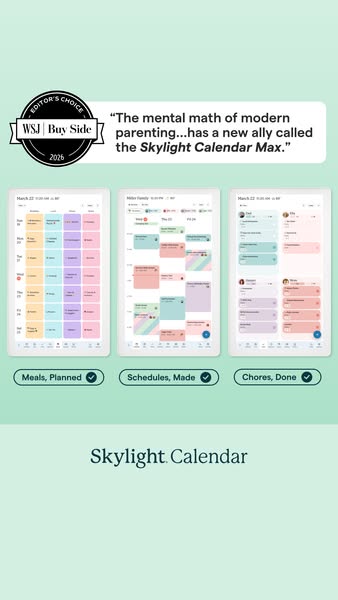
This ad promotes the Skylight Calendar Max and touts it as 'a new ally' for modern parenting. A quote from the WSJ Buy Side supports this claim. The ad showcases the calendar's planning capabilities with three screenshots of the product interface. The visuals convey ease of use, especially for managing meals, schedules, and chores.
# Brand positioning
Skylight Calendar presents itself as a modern solution for busy families seeking to streamline their scheduling and organization. The brand aims to occupy the space of a helpful, technologically advanced tool that simplifies the complexities of family life, especially parenting. Skylight aligns with the values of efficiency, convenience, and family-centric living, pushing against the chaos and mental burden often associated with managing multiple schedules. The brand positioning is functional, focusing on performance and simplicity, providing a centralized hub to coordinate and keep track of various family activities.
# Product
The Skylight Calendar Max is presented as a tool to help families manage and coordinate their schedules, chores, and meals. The product is for modern parents and families looking to streamline their organization. As shown in the ad, the calendar displays a monthly view with color-coded entries for different activities and family members. The product addresses the pain point of managing the mental load of modern parenting by offering a centralized system for keeping track of all family events and responsibilities. The visuals showcase the calendar being used to plan meals, make schedules, and assign chores.
# Visual style
The ad has a clean, minimalist aesthetic with a focus on showcasing the product's interface. The production quality is high, with studio-shot visuals and a simple layout. The image treatment includes background removal and color blocks to highlight the product features. The typography is clean and legible, with a focus on scannability in the feed.
# Hooks
Headline: "The mental math of modern parenting...has a new ally called the Skylight Calendar Max."
# Benefits
- [object Object]
- [object Object]
- [object Object]
# Features
- [object Object]
- [object Object]
# Call to action
None used.
# Point of view
- [object Object]
# Storyline
- The ad opens with an endorsement from WSJ Buy Side, declaring the Skylight Calendar Max 'a new ally' for managing the mental load of modern parenting. This establishes credibility and positions the product as a trusted solution, told from the perspective of an external source.
- The ad transitions to showcasing the product's features, displaying three digital calendars filled with planned activities. The visuals focus on how the calendar looks in use, organized with different activities, and this provides a glimpse into the calendar's functionality, told from the brand's perspective.
- The ad ends with three key value propositions, highlighting the calendar's ability to help families manage 'Meals, Planned,' 'Schedules, Made,' and 'Chores, Done,' reinforcing the idea that the product simplifies family organization, told from the brand's perspective.
# Ad summary
This ad promotes the Skylight Calendar, which allows parents to coordinate their family's activities and chores.
# Brand positioning
Skylight Calendar is presented as a smart home solution that seeks to alleviate the mental load and organizational challenges that come with managing a family's schedule. The brand positions itself as a tool to reduce nagging and increase independence for kids. By providing a centralized, visible hub for all family members to see their tasks, Skylight simplifies communication and day-to-day management. It aims to bring peace and order to households by streamlining family routines and task management.
# Product
The Skylight Calendar is a wall-mounted digital display that serves as a shared family organizer. It visually presents each family member's schedule, chores, and activities. The ad shows that the calendar syncs to family member's devices to create a single, shared location for all responsibilities. Tasks are assigned and tracked within the system, so that parents don't have to repeat instructions. Once a task is completed, a satisfying animation plays, providing positive reinforcement. The ad conveys that this allows family members to independently view and manage their own schedules, alleviating the mental load on parents and fostering independence and responsibility among children. The overall effect is intended to promote a more harmonious and organized family life.
# Visual style
The ad features a clean and simple visual style with a neutral background. The focus is on the product, the Skylight Calendar, and its user interface. The lighting is soft and even, providing a clear view of the digital display and the hand interacting with it. The editing consists of static shots with direct cuts to highlight different features and benefits of the product. The video uses a UGC style, presenting the product in a practical setting to appeal to the everyday parent.
# Benefits
- [object Object]
- [object Object]
- [object Object]
- [object Object]
- [object Object]
- [object Object]
# Features
- [object Object]
- [object Object]
- [object Object]
- [object Object]
- [object Object]
- [object Object]
# Call to action
None used.
# Point of view
- [object Object]
# Storyline
- 00:00–00:06 The ad begins by showcasing the common parental frustration of constantly reminding children about homework, chores, and practice, setting up the problem that the Skylight Calendar is designed to solve.
- 00:06–00:07 The ad transitions to a solution by introducing the Skylight Calendar. It is presented as a tool to streamline family scheduling and task management.
- 00:07–00:12 The ad demonstrates how the Skylight Calendar allows everyone to see the schedule, reducing the need for parents to constantly repeat instructions, which addresses a key pain point.
- 00:12–00:14 The ad emphasizes how the kids can independently see what needs to get done, highlighting increased independence.
- 00:14–00:17 The ad highlights the outcome of using the Skylight Calendar. The device allows days to run more smoothly. A smiley face emoji is used to underscore the satisfaction and ease this product provides.
- 00:17–00:20 The ad emphasizes that the Skylight Calendar gets everyone on the same page, clarifying responsibilities and reducing mental load.
- 00:20–00:23 The ad showcases the positive reinforcement element, showing the satisfying reward animation after the daily tasks have been completed.
# Ad summary
This ad promotes Skylight Calendar 2, a digital calendar that is designed to be used by the whole family. The presenter highlights some of the features on the calendar including syncing your digital calendars, a meal planner that creates grocery lists, a reward system for kids, and the ability to upload photos. The calendar integrates with a phone app for mobile use.
# Brand positioning
Skylight aims to position itself as a modern, aesthetically pleasing, and user-friendly family tech company that prioritizes simplicity and seamless integration into the home environment. It offers functional solutions for modern families that also align with their lifestyles. The company promotes the idea of creating technology that complements the decor of a home, rather than disrupting its aesthetic.
# Product
The Skylight Calendar 2 is a digital family calendar that combines scheduling, task management, and organizational features in a single, visually appealing device. It integrates with Google and Apple calendars, syncs in real time, and has a customizable magnetic snap frame. It offers meal planning with automatic grocery list creation, a reward system for kids' chores, and photo uploading capabilities. The core functions of the calendar, tasks, and lists do not require a subscription. The plus subscription allows for uploading of images and other files.
# Visual style
The ad has a polished and bright aesthetic, with a mix of selfie-style shots and product demos. It's well-lit, with smooth transitions between shots. The editing rhythm is consistent, with moderate pacing to keep the audience engaged without feeling rushed. The visuals are synced with the audio, with cuts and product actions timed to voiceover lines. The ad maintains a clean and professional look, enhancing its credibility and appeal to a family audience.
# Benefits
- [object Object]
- [object Object]
- [object Object]
- [object Object]
- [object Object]
- [object Object]
- [object Object]
# Features
- [object Object]
- [object Object]
- [object Object]
- [object Object]
- [object Object]
# Call to action
Tap the link and go check it out.
# Point of view
- [object Object]
# Storyline
- 00:00–00:05 The presenter introduces the Skylight Calendar 2 as a piece of family tech that looks good in the house, before showing the product packaging.
- 00:06–00:10 The presenter says she loves that it feels like a part of our home, not random tech hanging on a wall or sitting on a countertop, before opening the package and taking the digital calendar out.
- 00:11–00:21 The presenter says it’s thin, bright, and the different colour magnetic snap frames are probably one of my favourite new features, while taking off the frame and talking about the customization.
- 00:21–00:25 The presenter says it’s not just pretty, it is my family's entire life in one place before she and a child begin navigating the calendar.
- 00:25–00:31 The presenter says sports, practices, games, school stuff, and when times change in our sports apps, it updates right here in real time.
- 00:32–00:36 The presenter states It syncs with our Google and Apple calendars so it’s always up to date before navigating the calendar on the screen.
- 00:36–00:39 The presenter mentions there’s no guessing, no double booking, and I can check or add things from the app when I’m out.
- 00:40–00:42 The presenter states grocery store, car line, wherever, it doesn’t matter before showing the phone app on a mobile device.
- 00:43–00:47 The presenter explains Best part is you don’t even need a subscription for the core stuff. Calendar, tasks, and lists all work without one.
- 00:48–00:51 The presenter explains We do use the plus subscription, honestly, because it’s super helpful before interacting with calendar and meal planning.
- 00:51–00:57 The presenter explains I’m constantly uploading school calendars, school lunch menus, flyers for activities, before showing an example of adding a photo from the mobile app.
- 00:57–01:03 The presenter shares that The meal planner is great because it helps me plan meals out for the week, It can even turn all of that into a grocery list so I don’t forget anything.
- 01:04–01:10 The presenter says And our kids love the rewards feature for completing their chores and tasks, because it actually makes them feel like they’re working towards something.
- 01:10–01:14 The presenter adds that It genuinely has helped reduce my mental load because everybody can see what’s happening.
- 01:14–01:18 The presenter says It’s giving, Mom has her life together. But also, Mom has great taste.
- 01:18–01:27 The presenter mentions I don’t know if you know this, but you can try it risk free with their four month free returns. If there has ever been a time to buy it, now that they’ve released the skylight calendar too, this is it. Tap the link and go check it out.
# Ad summary
This ad promotes the Skylight Calendar 2 as a solution for busy dads overloaded with schedules. The product is shown in a modern home kitchen, syncing with multiple calendars into one touchscreen.
# Brand positioning
Skylight is presented as a modern, practical solution for busy households, particularly targeting parents who are juggling multiple schedules. The brand aims to simplify family organization through its digital calendar, positioning itself as a tool that reduces the frustration and time wasted on managing multiple calendars. It promotes convenience and efficiency, aligning with a lifestyle where parents want to stay organized without the stress of traditional methods. Skylight pushes against the norms of using multiple, often unsynchronized calendars by offering a unified, user-friendly touchscreen device. This functional positioning emphasizes simplicity and ease of use, making it an appealing option for those seeking a straightforward solution to scheduling conflicts.
# Product
The featured product is the Skylight Calendar 2, a touchscreen device designed to sync multiple calendars into one always-up-to-date display. This product aims to solve the problem of managing various schedules for work, maintenance, kids, and spouses, making it ideal for busy households. The Skylight Calendar 2 is presented as a solution that saves time and eliminates the need for constant inquiries about schedules. Its unique selling points include its ability to consolidate all calendars into one accessible location, reducing the overload and frustration associated with juggling multiple systems. The calendar is shown in a kitchen setting, suggesting it is a central hub for family organization. Key features include its touchscreen interface, syncing capabilities, and the ability to display grocery lists and to-do lists. The ad addresses the purchase barrier of disorganized scheduling by offering a simple, unified solution that integrates seamlessly into daily life.
# Visual style
The ad has a UGC feel with a mix of static shots and close-ups. The editing style is smooth and straightforward, without quick cuts or jump cuts. The production quality is polished enough to convey reliability. The aesthetic is clean and modern, fitting the lifestyle of busy parents. The pacing is consistent, matching the conversational tone of the voiceover. Visuals are timed to coincide with the speaker’s points, emphasizing the product’s features and benefits.
# Benefits
- [object Object]
- [object Object]
- [object Object]
# Features
- [object Object]
- [object Object]
# Call to action
None used.
# Point of view
- [object Object]
# Storyline
- 00:00–00:04 A busy dad expresses his frustration with managing multiple schedules for work, maintenance, kids, and his wife.
- 00:04–00:09 He highlights the inefficiency of using multiple calendars that inconsistently track events, leading to more frustration than help.
- 00:09–00:16 The dad introduces Skylight Calendar as a solution that has changed everything by syncing all his calendars into one always-up-to-date touchscreen.
- 00:16–00:21 The ad emphasizes that Skylight Calendar saves time, reduces overload, and eliminates the need for constant inquiries about schedules.
- 00:21–00:29 The dad sarcastically asks what the plans are for the weekend, then jokes that he knows and points to the Skylight Calendar, promoting it as the solution to stop missing events and arguing over schedules.
- 00:29–00:32 The dad concludes by stating that Skylight is the one calendar that actually works for real life.
# Ad summary
This ad promotes the Skylight Calendar Max as a solution for parents seeking to organize their families and encourage their children to complete chores without nagging. The ad showcases the product's features, such as chore assignments, routines, and reward systems, emphasizing its ability to foster healthy habits in kids. The ad employs a testimonial format and focuses on the emotional relief and organizational benefits the product offers to busy parents.
# Brand positioning
Skylight Calendar Max positions itself as a modern solution to household organization, geared toward families with young children. The brand aims to occupy the space of an efficient, technologically advanced family assistant that promotes structure and collaboration without creating extra work for the parents. It aligns with a lifestyle where technology is seamlessly integrated into daily routines to improve efficiency and reduce stress, and promotes positive parenting through encouragement rather than nagging. The brand's positioning is functional by solving concrete problems around household organization and task completion, while also delivering emotional benefits such as reduced stress and increased family harmony.
# Product
The Skylight Calendar Max is a digital, wall-mounted calendar designed to help families organize their schedules, assign chores, and build routines. It features a large touch screen where family members can view and interact with a shared calendar, assign tasks, and track progress. The product is targeted towards parents who struggle with managing family schedules and motivating their kids to complete chores. Features include the ability to assign chores, create and follow routines, and reward kids with stars for completed tasks, fostering healthy habits and reducing the need for parental nagging. A USP of the product is its ability to facilitate family organization while promoting independence and motivation in children. The ad highlights that the product helps "start building healthy habits" for all family members.
# Visual style
The ad has a bright, clean, and casual aesthetic, resembling user-generated content. The lighting is natural, creating a warm and inviting atmosphere. The editing style incorporates quick cuts to showcase different features of the product and maintain viewer engagement. The production quality is good but retains a UGC feel, making it relatable to the target audience. The pacing is moderate, with cuts timed to highlight key features and transitions between scenes, creating a smooth viewing experience. The visuals of the product in use are synced with text overlays, enhancing comprehension and emphasizing benefits.
# Benefits
- [object Object]
- [object Object]
- [object Object]
- [object Object]
# Features
- [object Object]
- [object Object]
- [object Object]
# Call to action
Get the Skylight Calendar and start building healthy habits
# Point of view
- [object Object]
# Storyline
- 00:00–00:02 A woman stands at a white island and opens a teal box labeled 'Calendar Max'. She appears excited and curious about the product inside.
- 00:02–00:03 The woman removes the Calendar Max from the box and holds it up to display its full size. This action emphasizes the product's physical presence and its unveiling.
- 00:03–00:04 The Calendar Max is shown mounted on a wall and powered on. The woman interacts with the screen, showing the product in use. This demonstrates how the product fits into a home environment and how it operates.
- 00:04–00:06 A young girl uses the touch screen to manage her assigned chores. This illustrates the product’s ease of use for children and highlights the "Chores Feature". The message conveyed is that kids can take action on their own, without needing constant parental reminders.
- 00:06–00:09 The same young girl sweeps a floor, demonstrating how the "Routines Feature" enables kids to follow structured tasks, so they know exactly what to do and when. This continues to emphasize the product's utility and simplicity.
- 00:09–00:12 The woman interacts with the Calendar Max, adding stars as rewards for chores completed. This highlights the "Rewards Feature" and shows how the product motivates children. The message here is that kids stay motivated with stars for every chore they complete, encouraging continued participation and responsibility.
- 00:12–00:15 A man gives the Calendar Max box to the woman who gasps with delight. Both of them hold the box together, showing its branding. The ad culminates with a call to action, urging viewers to get the Skylight Calendar and start building healthy habits.
How Other Technology Brands Advertise on Meta
Peer brands in Motion's library — click any brand to see their creative strategy, live ads, and AI breakdowns.