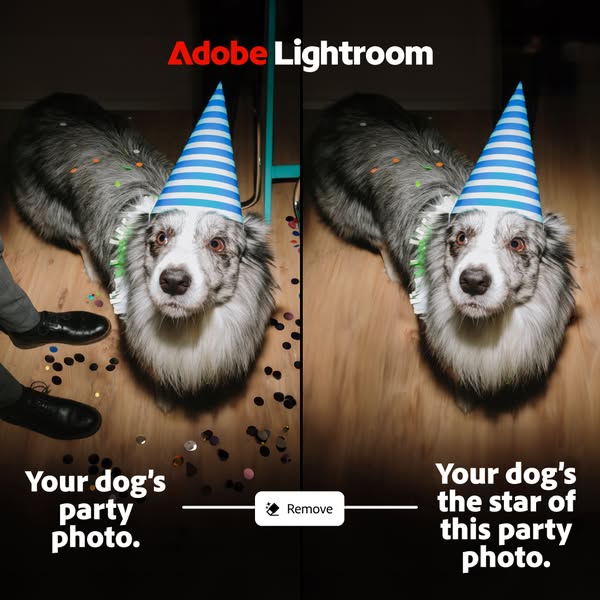
Adobe Lightroom runs 470 active ads on Meta, shipping ~16 new creatives per week. Their library leans on Before and After32%, Screen Recording26%, and Demo9%. Recently, lightroom is hammering home one killer feature above all else: the object removal tool, positioning the app as the dead simple solution for cleaning up photos by erasing distractions, unwanted people, or background clutter with one tap. They're leading with relatable, everyday scenarios like pet photos, selfies, and candid moments where something or someone ruins the shot, making the value prop immediately tangible rather than burying it in broader editing capabilities. It's a mass market play that deprioritizes pro features (one Leica tethering outlier aside) to own the "fix my phone photo fast" user need.
# Ad summary
This ad for Adobe Lightroom promotes its ability to enhance photos of pets. The ad features a photo of a dog on a walk, with the Adobe Lightroom logo at the top.
# Brand positioning
Adobe Lightroom is presented as a user-friendly photo editing software that helps users enhance and perfect their photos. It's positioned for everyday use, particularly for those who want to capture and improve images of their pets. The brand aims to occupy a space in the consumer's mind as a go-to tool for making photos look their best with minimal effort, fitting into a lifestyle of sharing and cherishing memories. Adobe Lightroom presents itself as accessible and relevant to both amateur and professional photographers.
# Product
Adobe Lightroom is a photo editing software designed to enhance and perfect photos. The product enables users to edit pictures. It is for anyone looking to make their photos look their best, especially pet owners wanting to capture and improve images of their furry friends. The advertisement conveys that with Adobe Lightroom, users can easily enhance their photos to show off their pets.
# Visual style
The ad has a casual, natural aesthetic, resembling a snapshot taken outdoors. The production quality appears to be mid-range, suggesting it was likely shot on a smartphone or similar device. The image has a slight color grading to enhance the vibrancy of the greens in the grass and the white color of the dog's fur. The typography is clean and simple, overlaid directly onto the image. The ad's style aligns with the platform's native behaviors, fitting seamlessly into an in-feed experience.
# Hooks
Headline: Your furry friend.
# Benefits
- [object Object]
# Features
- [object Object]
# Call to action
None used.
# Point of view
- [object Object]
- [object Object]
# Storyline
- The ad opens with a close-up photo of a dog in a park, establishing the scene and subject. This is from the perspective of the photographer, who is capturing a moment with their pet.
- The Adobe Lightroom logo is displayed at the top, associating the brand with the image and implying that the photo was enhanced using the software. This is from the brand's perspective, promoting the software's capabilities.
- The text "Your furry friend." appears, emphasizing the ad's focus on pet owners and suggesting that Lightroom can help capture the best images of their pets. This is from the brand's perspective, directly addressing pet owners.
# Ad summary
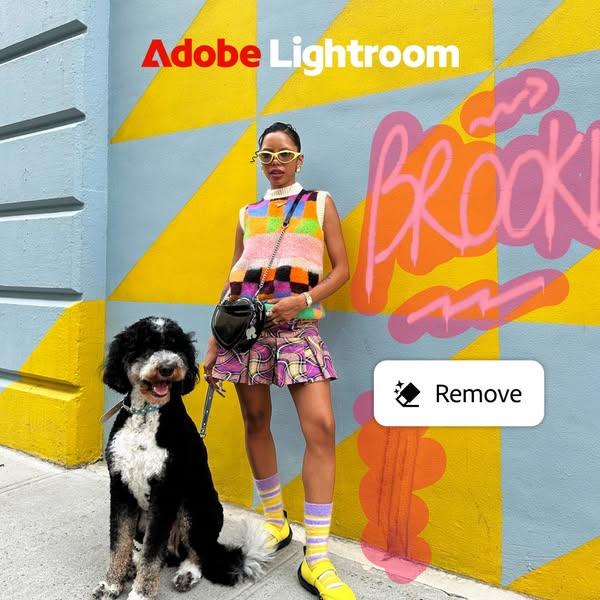
This ad for Adobe Lightroom showcases the remove feature. The ad features a woman standing in front of a colorful wall with graffiti. The remove feature is highlighted with a button that says "Remove".
# Brand positioning
Adobe Lightroom is presented as a tool for creative expression and photo editing. The brand is positioned as a way to enhance and modify photos, as demonstrated by the remove feature. The brand aligns with a lifestyle of creativity and digital enhancement, offering tools that allow users to refine their images. Adobe Lightroom aims to occupy the space of a user-friendly yet powerful photo editing software, pushing against the complexity of traditional photo editing tools by offering intuitive features.
# Product
The advertised product is the "Remove" feature within Adobe Lightroom, a photo editing software. This feature allows users to remove unwanted elements from their photos, as demonstrated by the button in the image. The product is for anyone who wants to edit and enhance their photos, particularly those who want to remove distracting or unwanted objects. The ad highlights the ease of use of the feature, suggesting that it is simple and effective. The ad addresses the purchase barrier of complex photo editing by showcasing a user-friendly tool that can quickly improve photos.
# Visual style
The ad has a highly polished, studio-shot production quality. The visual motif is a colorful and modern aesthetic. The image treatment includes background removal and color grading. The typography integration is large and bold. The style is disruptive and high-design, which might impact scannability or stop power in feed.
# Hooks
Headline: None used
# Benefits
- [object Object]
# Features
- [object Object]
# Call to action
None used.
# Point of view
- [object Object]
# Storyline
- The ad opens with a woman standing in front of a colorful wall with graffiti. This is included to provide a visually interesting backdrop that can be enhanced with the Adobe Lightroom remove feature. The audience is experiencing this from the brand's perspective, showcasing the potential of the software.
- A button appears on the image that says "Remove". This is included to highlight the remove feature of Adobe Lightroom. The audience is experiencing this from the brand's perspective, showcasing the software's capabilities.
# Ad summary
This ad demonstrates the Object Removal tool in Adobe Lightroom. It features a woman at a picnic, and then it shows how to use the object removal tool to remove a man from the background, leaving a cleaner-looking photo.
# Brand positioning
This ad promotes Adobe Lightroom as a solution for photo editing. It highlights the app's ability to remove unwanted objects from photos, positioning it as a user-friendly tool for achieving professional-quality results. The brand aims to occupy a space in the consumer's mind as a provider of tools for photography enhancement, suitable for users of all skill levels. The brand uses simple, clear visuals and messaging to convey a sense of ease and efficiency. The brand positioning is functional, emphasizing the app's capabilities and practical benefits rather than emotional appeals.
# Product
The ad features the Object Removal tool within Adobe Lightroom, an app used for editing photos on mobile devices. It shows how the tool can be used to remove unwanted objects or people from a photo. The user simply taps the 'Remove' button, highlights the object, and the app automatically fills in the space. This tool is for anyone who wants to improve their photos quickly and easily, especially for social media sharing. The ad addresses the frustration of distracting elements in photos, showcasing how Lightroom can create cleaner, more visually appealing images.
# Visual style
The ad has a bright and cheerful aesthetic with natural lighting, giving it a UGC feel. The editing is simple and quick, demonstrating the app's function efficiently. The pacing is consistent with the app’s feature demonstration. The cuts and text are timed to coincide with the demonstration.
# Benefits
- [object Object]
- [object Object]
# Features
- [object Object]
# Call to action
None used.
# Point of view
- [object Object]
# Storyline
- 00:00–00:03 00:00–00:03 A woman is posing for a picture at a picnic with a man behind her. The scene is pleasant, but the focus is slightly cluttered.
- 00:03–00:09 00:03–00:09 A user interface appears, demonstrating how to use the 'Remove' feature. The man in the background is highlighted and then removed from the scene, simplifying the image.
- 00:10–00:12 00:10–00:12 The final image is shown, now without the distraction of the man in the background, resulting in a cleaner, more focused photo.
# Ad summary
An image of a small terrier-type dog in a grassy yard. The dog is the subject of a photo edited with Adobe Lightroom.
# Brand positioning
Adobe Lightroom is not explicitly positioned in this ad, but it is implied that the brand focuses on providing tools for high-quality photo editing for amateur or professional photographers. The brand promotes the idea that with the right tools, anyone can take their photos to the next level. The brand positioning is functional, offering features that improve the quality and aesthetic appeal of photos.
# Product
The advertised product is Adobe Lightroom, a photo editing software. It is not explicitly stated how the software works, but it is implied through the imagery that the product is used for enhancing photos with a high-quality outcome. The product is for people who want to improve the quality of their photos. The ad does not mention any explicit features, ingredients, or design details, but it shows an example of the software in action. The ad addresses the common purchase barrier of not having the skills or equipment to take professional-looking photos by demonstrating that anyone can achieve high-quality results with their software.
# Visual style
The ad has a natural and realistic visual style, resembling a snapshot taken outdoors. The production quality is high, suggesting a professional-quality photo. The lighting is bright and natural, with no obvious filters or color grading. The image is clean and simple, with a focus on the subject. The typography is integrated subtly at the bottom of the image, with the Adobe Lightroom logo providing a clear brand identifier.
# Hooks
Headline: Your furry friend.
# Benefits
- [object Object]
# Features
- [object Object]
# Call to action
None used.
# Point of view
- [object Object]
- [object Object]
# Storyline
- The ad features an image of a dog, looking up toward the right side of the frame. This message is intended to connect with pet owners and show the software's ability to enhance even the most casual snapshots. The audience experiences this part of the story from the customer's perspective, admiring the beauty of their pet.
- The Adobe Lightroom logo is displayed at the bottom of the frame. This moment is from the brand's perspective and aims to show that the image shown was enhanced using the app.
# Ad summary
This ad for Adobe Lightroom shows a photograph of a woman and a dog in front of a mural, and highlights the 'remove' feature that allows users to remove unwanted objects from a photograph with one touch.
# Brand positioning
Adobe Lightroom is positioned as a tool for creating and editing professional-level photos. It aims to occupy the space in the consumer's mind as an easy-to-use product for removing objects in photos.
# Product
Adobe Lightroom is presented as photo editing software that makes it simple to remove objects from your photos. The ad is showing a user removing a section of a mural with the touch of a finger. The user can take unwanted objects out of their photos with ease using the remove tool.
# Visual style
The ad uses a bright, colorful, and modern visual style. The production quality appears highly polished. The image treatment includes background removal and highlighting of the 'remove' feature with a white box that contrasts with the colorful mural behind it. The overall aesthetic feels current and designed for in-feed scannability.
# Hooks
Headline: Gone in a touch.
# Benefits
- [object Object]
# Features
- [object Object]
# Call to action
None used.
# Point of view
- [object Object]
# Storyline
- The ad opens with a woman and dog posing in front of a mural. This is intended to draw the viewer in with a visually appealing image that reflects a real-world setting. The viewer is experiencing this image from the brand's perspective, showing an example of a photograph that could be taken.
- The ad highlights the 'Remove' tool within Adobe Lightroom, implying that users can easily eliminate unwanted objects from photos. This is from the brand's perspective, highlighting a key feature and its benefit.
# Ad summary
This ad shows a before and after of using Adobe Lightroom to remove a background object from a photo of a dog.
# Brand positioning
This ad presents Adobe Lightroom as an easy-to-use photo editing tool. The focus is on a simple, yet impressive function, which suggests the brand prioritizes accessibility and tangible results. By showcasing the before and after effect of removing a background object, Adobe Lightroom positions itself as a practical solution for improving photos without requiring advanced technical skills. The ad skips complex features or jargon, appealing to users who want quick, effective enhancements.
# Product
This ad features Adobe Lightroom, a photo editing software, highlighting its object removal capabilities. The ad showcases a before-and-after scenario, where the 'before' image features a dog with an unwanted object in the background, and the 'after' image shows the same dog with the object seamlessly removed. The clear implication is that Lightroom simplifies complex editing tasks, making it accessible to users who want to enhance their photos quickly and easily. The ad aims to overcome the barrier of perceived difficulty in photo editing by demonstrating a straightforward, effective solution. The red Adobe Lightroom logo is in the bottom left corner of the after image.
# Visual style
The visual style is a split-screen before-and-after shot. The production quality is mid-range, with a slight editing filter to emphasize the effect of the removal tool. The typography is integrated minimally, with the brand name subtly placed in the corner. Overall, the style aims for a balance between demonstrating functionality and feeling accessible.
# Hooks
Headline: None used
# Benefits
- [object Object]
- [object Object]
# Features
- [object Object]
# Call to action
None used.
# Point of view
- [object Object]
- [object Object]
# Storyline
- The ad opens with a side-by-side comparison: on top, a photo of a dog in a field with a blurred, coral-colored object behind it; on the bottom, the same dog and field, but the object is now gone. This 'before and after' shot immediately grabs attention by presenting a common problem and its straightforward solution, from the brand's perspective.
- The brand adds a text overlay in each image, in Korean. The top text is accompanied by a 'remove' button between the two images. The text reinforces what the audience is viewing in the image.
- Finally, the 'after' shot has the Adobe Lightroom logo watermarked in the bottom left corner, to identify the product. This identifies the brand as the solution.
# Ad summary
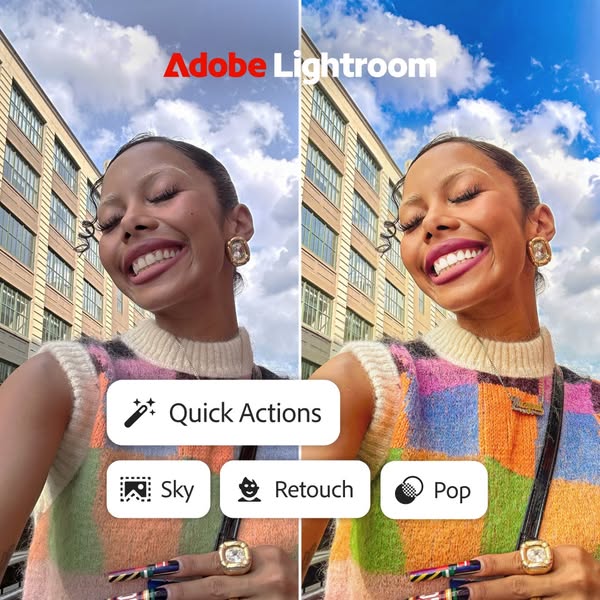
This ad for Adobe Lightroom features a split screen of a woman's selfie before and after using the app. The ad highlights the app's quick action features for sky replacement, retouching, and adding pop to photos.
# Brand positioning
Adobe Lightroom is presented as a user-friendly and accessible photo editing tool that empowers individuals to enhance their photos quickly and easily. The brand is positioned as a solution for achieving professional-looking results with minimal effort, making it suitable for both casual users and those seeking more advanced editing capabilities. The brand aims to occupy the space of accessible yet powerful photo editing, pushing against the notion that photo enhancement requires complex software or extensive expertise. The brand's positioning is functional, focusing on the simplicity and efficiency of its features.
# Product
Adobe Lightroom is presented as a photo editing application that offers quick and easy solutions for enhancing photos. The ad highlights the app's "Quick Actions" feature, which includes options for sky replacement, retouching, and adding "pop" to images. The product is for anyone looking to improve their photos with minimal effort. The ad addresses the purchase barrier of complex photo editing software by showcasing the app's user-friendly interface and one-tap editing capabilities. The ad conveys that Adobe Lightroom is worth trying or buying because it offers professional-looking results without requiring extensive editing knowledge or time.
# Visual style
The ad has a clean and modern visual style. The production quality is high, with a focus on showcasing the app's features in a clear and concise manner. The image treatment includes color grading and lighting effects to enhance the overall aesthetic. The ad mimics a platform-native style, with the use of circular buttons and icons that are commonly found in mobile apps. The typography is large and bold, making it easy to read and scan.
# Hooks
Headline: None used
# Benefits
- [object Object]
- [object Object]
# Features
- [object Object]
- [object Object]
- [object Object]
- [object Object]
# Call to action
None used.
# Point of view
- [object Object]
# Storyline
- The ad opens with a split-screen showcasing a selfie before and after being edited with Adobe Lightroom. This is intended to immediately demonstrate the transformative power of the app's features from the brand's perspective.
- The ad highlights the "Quick Actions" feature, specifically showcasing the sky replacement, retouch, and pop options. This is intended to emphasize the app's user-friendly interface and one-tap editing capabilities from the brand's perspective.
# Ad summary
This ad for Adobe Lightroom uses a small gray dog to show how easily it is to remove a background object with the object removal tool.
# Brand positioning
Adobe Lightroom is a photo editing software used by professionals and amateurs to edit images. The software aims to empower users to easily adjust their photos to their liking.
# Product
Adobe Lightroom is a photo editing software for both mobile and desktop that allows the user to edit and adjust their photos. The USP of the product is its object removal tool.
# Visual style
The visual style is very simple with static shots and simple transitions.
# Benefits
- [object Object]
# Features
- [object Object]
# Call to action
자세히 보기 (Learn more)
# Point of view
- [object Object]
# Storyline
- 00:00–00:07 The video opens on a small gray dog in a park, in front of a golden doodle. This shot is meant to show how Adobe Lightroom's object removal tool makes it easy to remove an undesired object from a photo.
- 00:07–00:14 The video then transitions to the Adobe Lightroom logo. The Adobe Lightroom logo indicates that the viewer can learn more about the app.
# Ad summary
This ad demonstrates the tethering support feature for Leica available on Adobe Lightroom Classic, a feature that allows you to instantly review images in detail.
# Brand positioning
Adobe Lightroom Classic is presented as a tool designed to streamline the post-production workflow for photographers. It positions itself as a user-friendly solution for managing and editing large volumes of images, emphasizing efficiency and organization. The brand aligns with a professional aesthetic by focusing on saving time and enhancing detail. Its functional positioning is geared toward improving photographers' productivity, particularly when handling extensive shoots, pushing against the norm of time-consuming manual image selection.
# Product
Adobe Lightroom Classic is a post-production software designed for photographers to streamline the image selection process. The Assisted Culling feature in Lightroom Classic is designed to intelligently select the best captures from a shoot, filter images that are in sharp focus, and discard misfires or photos with exposure issues. Auto stacking groups images from different sets, making it easier to sort and select photos.
# Visual style
The ad presents a UGC-style format with a mix of studio and desktop shots. The aesthetic is modern, with pops of color from the photography studio setting. The editing style includes quick cuts to demonstrate the features of the software. The pacing is quick to maintain engagement.
# Benefits
- [object Object]
- [object Object]
- [object Object]
- [object Object]
- [object Object]
# Features
- [object Object]
- [object Object]
- [object Object]
- [object Object]
# Call to action
None used.
# Point of view
- [object Object]
# Storyline
- 00:00–00:05 The speaker explains how a photo took hours to shoot but minutes to edit with a new feature in Lightroom Classic.
- 00:05–00:15 The speaker explains that he had an idea for a portrait using gobo disks and RGB lights and wanted to include movement to make the scene more dynamic.
- 00:15–00:22 The speaker likes to experiment when taking photos, and Adobe recently added tethering support for Leica.
- 00:22–00:25 The speaker says the Lightroom Classic feature lets you instantly review the images in detail.
- 00:25–00:31 The speaker mentions how he captured hundreds of images, and it would take forever to find the best ones.
- 00:31–00:46 The speaker demonstrates that the assisted culling feature can filter by subject focus and quickly discard issues and how Auto Stacking effortlessly groups images.
- 00:46–00:52 The speaker explains how to save time on your next shoot by letting Lightroom Classic handle image culling for you.
# Ad summary
This ad for Adobe Lightroom demonstrates its ability to remove unwanted objects from photos.
# Brand positioning
Adobe Lightroom is presented as an innovative photo editing software that empowers users to create perfect images. The brand aims to occupy the space of professional-grade editing tools that are accessible to everyone. The ad emphasizes ease of use and precise control, indicating a position that bridges professional quality with user-friendly functionality. By highlighting features like object removal, the brand positions itself as a solution to common photo imperfections, enhancing personal memories, and improving overall image quality.
# Product
The product being advertised is Adobe Lightroom, a photo editing software designed to enhance and perfect images. The ad showcases its object removal feature, allowing users to eliminate unwanted elements from their photos easily. This feature is targeted towards anyone who wants to improve their photos by removing distractions and focusing on the primary subjects. The ad highlights the software's ability to ensure that "all eyes" are on the important parts of the image, thus addressing the purchase barrier of imperfect or cluttered photos. The ad aims to convey that Lightroom is a worthwhile tool for anyone seeking professional-quality photo editing capabilities.
# Visual style
The ad has a natural, brightly lit aesthetic. It appears to be shot outdoors in daylight. The image is well-composed with a shallow depth of field, focusing on the couple in the foreground. The red silhouettes in the background create a visual contrast, drawing attention to the object removal feature. The overall style is clean and modern, aligning with typical social media content.
# Hooks
Headline: सभी निगाहें बस दो खास लोगों पर।
# Benefits
- [object Object]
# Features
- [object Object]
# Call to action
* एक्स्ट्रा लोगों को हटाएँ
# Point of view
- [object Object]
- [object Object]
# Storyline
- The ad begins with a wide shot of a couple standing on a staircase with people walking behind them. The intention is to show a real-life scenario where unwanted objects or people can photobomb a perfect shot. This part of the story is told from the perspective of a photographer or someone wanting to capture a moment without distractions.
- The focus shifts to the text overlay, which asks the viewer to imagine "all eyes" on the two main subjects. This is to highlight the potential of perfect focus without distractions. This part of the story is told from the brand's perspective, emphasizing what their software can achieve.
- The scene includes a prompt to remove the unwanted people in the background using Adobe Lightroom. This part of the story is told from the brand's perspective, demonstrating a solution to the problem posed in the initial setup, encouraging the viewer to consider using their product.
# Ad summary
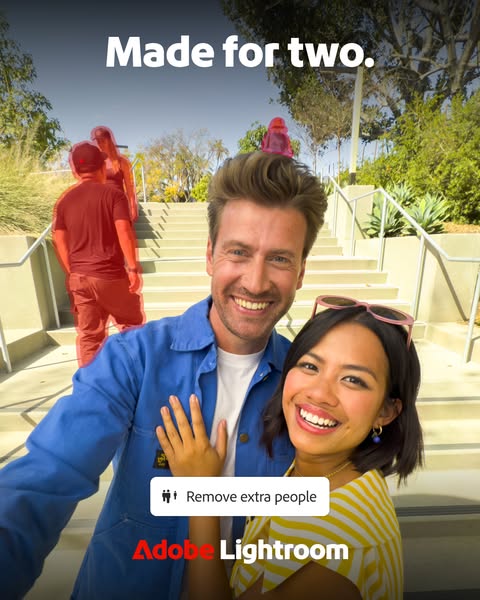
This ad for Adobe Lightroom highlights the feature of removing extra people from your photos, making it easy to ensure your photos are "made for two."
# Brand positioning
Adobe Lightroom is presented as a user-friendly, must-have software for photo editing. The brand is positioned as essential for achieving aesthetically pleasing photos that can be shared online. By showcasing a tool that solves the common problem of unwanted people in photos, the brand offers a practical and convenient solution for casual and professional photographers alike, emphasizing simplicity and efficiency in achieving high-quality results.
# Product
Adobe Lightroom is photo editing software that offers a tool to remove unwanted people from photos. The software is designed for people who want to take couple photos without anyone else in them. The ad shows the specific feature, "Remove extra people," presented as an easy to use tool for removing unwanted subjects from the background of images. This is showcased through an image of a couple posing for a selfie with two groups of people in the background highlighted in pink. Lightroom solves the problem of unwanted people in photographs, making it easier for users to capture perfect moments.
# Visual style
The ad features a bright, high-quality photograph with a modern, clean design. The image is well-lit, giving it a professional feel, and the typography is simple and legible. The overall style is visually appealing and aligns with current social media trends, making it easily scannable and engaging.
# Hooks
Headline: Made for two.
# Benefits
- [object Object]
# Features
- [object Object]
# Call to action
None used.
# Point of view
- [object Object]
# Storyline
- The ad opens with the phrase, "Made for two," suggesting that the image should ideally only contain two people, setting the context for the problem being addressed. The brand is establishing the need for perfect couple photos that are not photobombed.
- The ad then shows a couple taking a selfie in front of a staircase with other people in the background, indicating the common scenario of unwanted individuals appearing in photos. The customer is showing the real-life situation that often occurs when trying to take a photo in public.
- An in-app function is shown with the text "Remove extra people", which indicates the software's ability to easily remove unwanted subjects from the photo. The brand is illustrating its software's function to improve photos.
- The ad concludes with the Adobe Lightroom logo, reinforcing the brand behind the solution. The brand is solidifying its association with the image editing capability.
# Ad summary
This ad for Adobe Lightroom demonstrates the capabilities of the object removal tool. It shows a dog in a park on a sunny day and uses the object removal tool to remove another dog that is in the background.
# Brand positioning
This ad presents Adobe Lightroom as a tool for editing photos. The brand aims to occupy the space of user-friendly photo editing apps and encourages customers to care because editing photos is a way of showing off their creativity and enhancing the aesthetic value of the photos that they take. The brand is positioned as functional due to the fact that it shows the different features of the app and emphasizes how they work.
# Product
The ad features Adobe Lightroom, a photo editing application that allows users to edit photos. The ad specifically highlights the object removal feature of the product. This allows users to remove any unwanted objects in a photo, making it a useful tool for anyone that wants to take photos with no distractions. The product is for anyone looking to take their photo taking to the next level.
# Visual style
The ad has a UGC feel because it shows a simple photo of a dog. The editing style includes quick cuts and static shots. The production quality is polished because the editing is done smoothly. The pacing is medium and stays consistent throughout the ad.
# Benefits
- [object Object]
# Features
- [object Object]
# Call to action
Try now
# Point of view
- [object Object]
- [object Object]
# Storyline
- 00:00–00:03 The ad begins with a shot of a small dog in a park with a larger dog's rear in the background.
- 00:00–00:03 This moment introduces the viewer to the scene and shows what the photo looks like before editing. It is shown from the perspective of an observer.
- 00:03–00:07 The ad then moves into the photo editing function and a red brush is used to remove the large dog in the background.
- 00:03–00:07 This moment shows the viewer how easy it is to use the object removal tool. It is shown from the perspective of the person using the app.
- 00:07–00:09 The ad concludes by showing the edited photo of the dog with no other dog in the background.
- 00:07–00:09 The viewer is shown how the object removal tool is able to make a photo better. It is shown from the perspective of an observer.
- 00:10–00:13 The Adobe Lightroom logo is shown along with the 'Try now' CTA.
- 00:10–00:13 This tells the viewer what the brand is and encourages them to check out the app.
# Ad summary
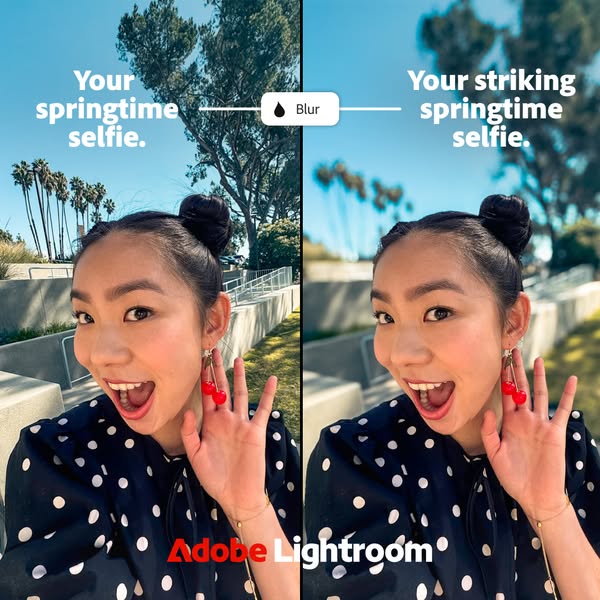
This ad uses a split screen to display before and after versions of a selfie, demonstrating the blur feature in Adobe Lightroom. The ad promotes Lightroom as a tool to enhance springtime selfies.
# Brand positioning
Adobe Lightroom is presented as a creative tool that enhances photos, specifically selfies. The brand positions itself as a solution for taking visually striking selfies. By showcasing the before and after effects, the brand demonstrates the functional improvement Lightroom can bring to everyday photos. The brand seemingly ignores any competitor comparisons, instead focusing on the functional aspects of its product.
# Product
Adobe Lightroom is presented as a photo editing tool designed to improve the visual appeal of selfies. The ad specifically highlights the “Blur” feature, which is shown to create a soft background. It is implied that the product is for anyone who wants to take striking selfies, especially during springtime. The product addresses the barrier of a visually distracting or unappealing background in selfies by offering a simple blur function. The ad emphasizes why Lightroom is worth trying by visually demonstrating how it can transform an ordinary selfie into a striking one.
# Visual style
The ad uses a split-screen format with a before-and-after comparison to highlight the effect of the "Blur" feature in Adobe Lightroom. The production quality appears polished, with well-lit and clear images. The visual motif is a direct comparison, enhanced by the slider graphic that visually separates the two states. The image treatment includes background blurring. The ad feels native to a platform where quick visual comparisons are common, aiming for high scannability in a feed.
# Hooks
Headline: None used
# Benefits
- [object Object]
# Features
- [object Object]
# Call to action
None used.
# Point of view
- [object Object]
- [object Object]
# Storyline
- The ad starts by showing a standard springtime selfie, indicating the original image quality before any editing. The message is that this is the starting point, presented from the customer's perspective, establishing the baseline before using the product.
- Next, the ad showcases the "Blur" feature in Adobe Lightroom through an interactive slider, visually demonstrating the transformation and improvement. This is told from the brand's perspective, highlighting the product's capability and how it enhances the image.
- Finally, the ad presents the after version of the selfie, now visually striking with a blurred background, emphasizing the enhanced outcome. The message is to show the potential results from the customer's perspective, demonstrating the value and impact of using the product.
# Ad summary
The ad is split vertically, displaying a low-lit 'before' image of a dog wearing a party hat surrounded by confetti next to a brightly lit and professionally edited 'after' photo of the same scene using Adobe Lightroom.
# Brand positioning
Adobe Lightroom is presented as a powerful yet accessible tool for enhancing the quality and impact of photographs. The brand is positioned to cater to individuals looking to elevate their visual content, whether for personal or professional use. This positioning allows Adobe Lightroom to occupy a space in the consumer's mind as an essential software for anyone aiming to transform everyday photos into polished, eye-catching images. It aligns with a lifestyle that values creativity and high-quality results.
# Product
Adobe Lightroom is an image editing software designed to enhance and transform photos. The product can brighten and enhance the photos in the ad with poor lighting. The ad appeals to users who want to make the subject of their photos the star of the image, by highlighting the software's ability to improve the lighting and overall quality of images. The ad showcases its application for party photos of a dog, and it addresses the barrier of poor lighting affecting the quality of pet photos.
# Visual style
The visual style of the ad employs a before-and-after split screen to dramatically highlight the editing capabilities of Adobe Lightroom. The production quality is polished, with clean lines and a focus on showcasing the transformation of the image. The typography is integrated cleanly with a bold, sans-serif font, contributing to a modern and professional look. The ad contrasts a dark, unedited photo with a bright, enhanced version, creating an immediate visual impact designed to stop users as they scroll.
# Hooks
Headline: Your dog's the star of this party photo.
# Benefits
- [object Object]
- [object Object]
# Features
- [object Object]
# Call to action
None used.
# Point of view
- [object Object]
- [object Object]
# Storyline
- The ad starts with a side-by-side comparison of an unedited photo of a dog at a party with confetti on the floor next to an edited photo. This is included to show the drastic improvement the application can provide. The audience is experiencing it from the brand's perspective.
- The ad proceeds to show that the initial photo of the dog is dark and has confetti all over the floor. This is to highlight that the picture lacks visual appeal. This is from the perspective of the customer.
- The ad ends by highlighting how the app brightens the photo and enhances the focus on the dog in the after photo. This shows how the subject of the photo becomes the star. This is shown from the brand's point of view.
# Ad summary
This ad shows the object removal capability of Adobe Lightroom. The user is taking a picture at a picnic and can easily remove the man in the background using the remove tool.
# Brand positioning
Adobe Lightroom is presented as a tool that helps you create the perfect photo without any unwanted objects in the picture. The brand seems to position itself as an innovative application with the goal of fixing photo editing struggles with easy-to-use tools. The brand attempts to occupy the space in the consumer's mind as the best, easiest, and most effective way to remove any objects in photos.
# Product
Adobe Lightroom is a photo editing application that can be used to remove objects or people in the background of a photo. In this ad, the focus is on Lightroom's 'Remove' feature. With one tap, the application quickly and efficiently removes any unwanted objects from the photo. This product is for people who want the perfect photo without any distractions.
# Visual style
The ad has a clean and polished aesthetic. The colors are bright and vibrant. The editing style uses sharp cuts and static shots. The production quality is high-end, which aims to support a modern tone.
# Benefits
- [object Object]
# Features
- [object Object]
# Call to action
None used.
# Point of view
- [object Object]
# Storyline
- 00:00–00:01 The ad opens with a picnic scene where a woman is posing for a picture with a man behind her who is making a silly face to distract from the photo. This aims to establish a common scenario where unwanted elements can spoil a photo.
- 00:01–00:02 The ad displays a button to remove the man using Adobe Lightroom’s feature. This is meant to show the viewer how easily Lightroom can fix the unwanted elements of the photo.
- 00:02–00:05 The man is removed and the picture looks much better. This is meant to drive home that Lightroom is a must-have photo editing tool because it is so effective at removing distractions from an image and creating the perfect picture.
# Ad summary
This ad promotes Adobe Lightroom. It shows a young woman taking a selfie outside on a sunny day. Text overlays encourage viewers to 'put your beautiful smile in the spotlight' while demonstrating how the app can enhance the sky and subject of the photo. The ad ends with a call to learn more.
# Brand positioning
Adobe is presented as a leading, user-friendly creative software provider. The ad leverages the emotional appeal of capturing and enhancing personal moments, while positioning the Lightroom app as a simple tool accessible to everyday users. The brand aligns with values of self-expression and creativity. It also seeks to challenge category norms by simplifying complex editing tools, positioning its product as easily accessible to even the most novice users.
# Product
The ad features Adobe Lightroom, a photo editing application. It highlights the app's ability to enhance photos through quick actions like subject and sky enhancements. The product is geared towards everyday users who want to improve their photos with minimal effort. The demonstrated USPs include ease of use and quick, professional-looking results. The ad shows the product in the context of outdoor photography, suggesting Lightroom is perfect for on-the-go editing. The ad seems to address the purchase barrier of complex photo editing by highlighting the app's simplicity and ability to enhance the photo of the user.
# Visual style
The ad has a bright, clean aesthetic with natural lighting and a polished commercial feel. The editing style is simple with static shots and smooth transitions. The visuals are crisp and clear. The pace is consistent with slow dissolves. The audio and visuals sync well, with text appearing to emphasize the features of the app.
# Benefits
- [object Object]
# Features
- [object Object]
- [object Object]
- [object Object]
- [object Object]
# Call to action
Learn more
# Point of view
- [object Object]
# Storyline
- 00:00–00:02 00:00–00:02 The ad opens with a shot of a young woman looking up at the camera and smiling against a blue sky. This shot conveys a sense of positivity and showcases her natural beauty. The perspective is from the camera's POV.
- 00:02–00:09 00:02–00:09 The visual shifts to a screen recording of the subject selecting ‘Quick Actions’ in the Adobe Lightroom app, and options appear in a drop-down menu: Auto, Subject, and Sky. This demonstrates the ease of use and range of enhancement options. The perspective is from the phone screen, conveying a user's perspective.
- 00:09–00:12 00:09–00:12 The camera returns to the shot of the woman from the opening, with text now overlaid: ‘Your beautiful smile in the spotlight.’ This is a continuation of the previous moment, connecting the app's features to the subject's beauty.
- 00:12–00:14 00:12–00:14 The Adobe and Adobe Lightroom logo appears on a white background. This is a brand reveal that identifies the product.
# Ad summary
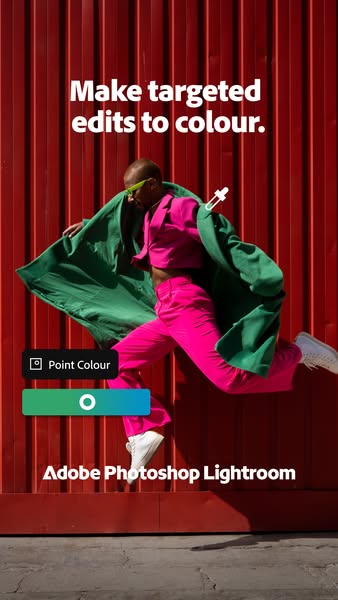
This ad for Adobe Photoshop Lightroom showcases the app's ability to edit specific colors in photos. A person is photographed in front of a red background, wearing brightly colored pink pants, a pink top, a green jacket, and lime-green sunglasses. The ad features a tool inside the Adobe Photoshop Lightroom app called Point Colour and lets users target specific colors in their photographs.
# Brand positioning
Adobe Photoshop Lightroom is presented as an accessible and precise tool for photo editing, sitting within the broader Adobe suite of creative software. The brand is positioning itself towards users who want to have targeted control over their images and create eye-catching edits. The brand promotes a lifestyle of creativity and precision and aligns with those who seek to refine their photos with specific color adjustments.
# Product
The Adobe Photoshop Lightroom app feature called Point Colour allows users to make targeted edits to color in their photos. The interface enables users to select a color and then precisely adjust it without affecting other colors in the image. This feature is designed for users who want to enhance the visual impact of their photos through specific color adjustments, making it a valuable tool for photographers and visual artists who seek a high degree of control over their images.
# Visual style
The ad has a vibrant and modern aesthetic, making use of bold color contrasts to capture attention. The production quality is polished, with a focus on dynamic composition and clear product presentation. The overall visual style is clean and contemporary, fitting for a tech-forward brand.
# Hooks
Headline: Make targeted edits to colour.
# Benefits
- [object Object]
# Features
- [object Object]
# Call to action
None used.
# Point of view
- [object Object]
# Storyline
- The ad opens with a person in bright, contrasting clothing against a red background, immediately capturing attention and showcasing the visual impact that targeted color editing can achieve. This is the brand's way of displaying the kind of eye-catching images that can be created with their product.
- Next, the ad displays the "Point Colour" feature from Adobe Photoshop Lightroom and demonstrates how to select and adjust specific colors. This comes from the brand's POV as they are showing the audience how to use the tool to target specific colors in photos.
- Finally, the ad prominently features the Adobe Photoshop Lightroom name, reinforcing brand recognition and tying the visual demonstration to the specific product. The brand is telling the audience what tool will help them create the types of images featured in the ad.
# Ad summary
The ad demonstrates how to remove an object from an image using Adobe Lightroom.
# Brand positioning
Adobe Lightroom is presented as an essential photo editing tool, emphasizing its utility in enhancing and perfecting images for both casual and professional use. The brand aligns with a lifestyle of creativity, convenience, and technological sophistication. Positioning itself to ignore category norms that might require complex software or expert skills, Adobe Lightroom offers a functional solution with an emotional appeal by promising to help users capture the best version of their visual memories, empowering them to be more creative and express themselves through imagery.
# Product
Adobe Lightroom is a photo editing software designed to enhance images, especially with the "Remove" feature demonstrated in the ad. The product works by allowing users to select and erase unwanted objects from their photos, seamlessly blending the background to make the object disappear. The demonstrated use case is for anyone who wants to improve the quality of their photos by removing distracting elements, such as a dog in the background. The ad suggests the product overcomes the barrier of needing advanced photo editing skills by offering a quick and easy way to clean up photos and create visually appealing images worth trying for any photo enthusiast or professional.
# Visual style
The ad has a polished commercial feel. It uses quick cuts and smooth transitions. The pacing stays consistent throughout the ad.
# Benefits
- [object Object]
# Features
- [object Object]
# Call to action
Try now
# Point of view
- [object Object]
# Storyline
- 00:00–00:07 A dog is standing on a grassy field.
- 00:07–00:09 The words, "Your furry friend in the spotlight," appears on the screen.
- 00:03–00:06 Adobe Lightroom App opens, demonstrating how to remove the other dog in the background by highlighting and removing it.
- 00:10–00:14 The Adobe Lightroom logo appears with the words, "Try now."
# Ad summary
This ad for Adobe Lightroom highlights its object removal capabilities. It shows an example of a user editing out a dog from an image using the object removal tool.
# Brand positioning
Adobe Lightroom is positioned as a user-friendly tool that empowers anyone to edit photos to a professional quality, and make creative edits easily. The brand aims to occupy a space in the consumer's mind as an accessible and powerful photo editing tool for both casual and professional users. The brand promotes simplicity and creativity, aligning with a lifestyle of visual expression. By showcasing a simple edit, the brand pushes against the norm of complex photo editing software.
# Product
The product featured is Adobe Lightroom, a photo editing software. The ad showcases the object removal tool, which allows users to easily remove unwanted objects from their photos. The tool is presented as user-friendly and effective, addressing the purchase barrier of complex photo editing processes. The product is for anyone who wants to enhance or alter their photos, whether for personal or professional use. The ad emphasizes the ease of use and the ability to achieve professional-looking results, making it worth trying or buying.
# Visual style
The ad has a clean and simple aesthetic with natural lighting. The editing style includes quick cuts to demonstrate the product's function and smooth transitions to the final logo. The production quality appears to be a hybrid of UGC and a polished commercial, using real-world footage but with a clear brand message. The pacing is consistent throughout, with the product action timed to a subtle sound effect.
# Benefits
- [object Object]
# Features
- [object Object]
# Call to action
Try now
# Point of view
- [object Object]
# Storyline
- 00:00–00:02 00:00–00:02: The ad opens with a shot of a small dog standing in a grassy park with another dog partially visible in the background. Text appears saying, 'Your furry friend.' The message is to connect with pet owners and set a familiar scene.
- 00:02–00:07 00:02–00:07: A finger taps the 'Remove' button on the screen, and a red overlay appears over the background dog and then disappears, indicating the function is being used. The dog in the background is removed. This action demonstrates how the tool works and its simplicity.
- 00:07–00:09 00:07–00:09: The text changes to, 'Your furry friend in the spotlight.' This highlights the desired outcome of focusing on the main subject of the photo and enhancing its visibility.
- 00:09–00:14 00:09–00:14: The ad transitions to the Adobe Lightroom logo and a 'Try now' button, encouraging viewers to try the product. This is a final call to action to prompt immediate engagement.
# Ad summary
This ad showcases Adobe Lightroom's photo editing capabilities through a series of dynamic and colorful shots of a young girl playing the drums. The ad quickly transitions between original shots and Lightroom-edited versions to highlight the app's ability to enhance photos and share them easily. The ad closes by emphasizing that Adobe Lightroom can help users make photos their own.
# Brand positioning
Adobe Lightroom is presented as a user-friendly and versatile tool for enhancing and sharing photos, suitable for both casual users and creative professionals. The ad emphasizes accessibility and ease of use, particularly on mobile devices, while still providing powerful editing capabilities. By focusing on ease of sharing, Lightroom positions itself as a tool for connecting and engaging with others through visual content.
# Product
Adobe Lightroom is presented as a mobile-first photo editing application that allows users to enhance and share their photos easily. The ad highlights features that allow users to make the subject of the photo pop. The ad showcases its ability to quickly transform and personalize photos with intuitive adjustment tools, as well as the ability to instantly share these edited photos with friends and family. The ad is geared towards eliminating the barrier of difficulty in creating share-worthy photos.
# Visual style
The ad has a polished, upbeat aesthetic with a mix of dynamic action shots and clean interface overlays. The editing style features quick cuts and transitions to keep the pace lively, while the overall production quality feels high-end with crisp visuals. The visual motifs include repeated shots of the girl playing drums and consistent color theming. The pacing is fast, with cuts roughly every 1-2 seconds, timed to the beat of the music. The audio-visual sync is tight, with transitions and text overlays aligning with the music and spoken elements.
# Benefits
- [object Object]
- [object Object]
- [object Object]
# Features
- [object Object]
- [object Object]
- [object Object]
# Call to action
None used.
# Point of view
- [object Object]
# Storyline
- 00:00–00:01 The ad opens with a high-energy shot of a young girl playing the drums, immediately capturing the viewer's attention with dynamic movement and vibrant visuals. The message is to convey energy and enthusiasm.
- 00:01–00:04 The ad shows the process of using Adobe Lightroom to edit the photo in real-time, demonstrating the app's capabilities and ease of use. This conveys the intention of showing how simple it is to enhance photos with the app.
- 00:04–00:09 The ad presents a series of thumbnail images, then selects and shares the enhanced photo via iMessage, illustrating the app's sharing capabilities and ease of integration with social platforms. The intention is to show the app's ability to transform photos and seamlessly share them with others, further encouraging viewers to try it.
- 00:10–00:15 The ad returns to a scene of the girl drumming, then cuts to text overlay of the end screen. The intention is to reinforce the brand's message and leave a lasting impression.
How Other Technology Brands Advertise on Meta
Peer brands in Motion's library — click any brand to see their creative strategy, live ads, and AI breakdowns.